Linked Gateway API
API Endpoint
https://api.paymark.nz/Overview
Paymark Linked Gateway (LG) is our payment gateway that allows other gateways to connect and settle financial transactions with acquirers and card schemes.
This portal includes the information needed on how to integrate directly with LG APIs.
LG supports the following transaction types:
-
Payment: charges the Customer’s card immediately and results in funds settled to the Merchant.
-
Refund: returns funds back to a Customer’s card and results in funds returned from the Merchant via the settlement process. Partial and full refunds are supported. Linked and standalone refunds are supported.
-
Status Check: validates Card details that a Customer has provided without reserving funds on the Card.
-
Authorisation: validates Card details that a Customer has provided and reserves funds on the Card for the Merchant. DOES NOT charge the Card and no funds are settled to the Merchant. An authorisation may be approved in full, or approved for a lesser amount (partial authorisation).
-
Capture: charges the Customer’s card using funds reserved from a prior authorisation, and results in funds settled to the Merchant.
-
Cancellation: this may include an authorisation, a payment, or even a capture — depending on the transaction’s state and processing window. When cancelling an authorisation, it releases reserved funds on the Customer’s card. When cancelling a payment or capture, it voids the transaction before settlement occurs, preventing funds from being transferred to the Merchant.
For any assistance with this API specification, please contact Paymark NZ on lgv2@paymark.co.nz.
Connections 
Transport
The Linked Gateway API is a RESTful API over HTTP, with a JSON payload.
HTTP Headers
In addition to the headers that are required by the HTTP protocol, Paymark NZ requires that you specify the User Agent, Accept and Authorization headers.
The User Agent header identifies the client software originating the request.
The Accept header is used to specify the content type that your client will accept. Linked Gateway uses application/vnd.paymark_api+json;version=2.0 as its content type. Any other requested content types will result in a 406 Not Acceptable response.
The Authorization header is used to authenticate and authorise requests to Linked Gateway.
Versioning
The Accept header is used to define the requested version of a resource, as defined in the HTTP Headers section.
You should expect that the Linked Gateway API will evolve over time as Paymark NZ adds new features. To ensure compatibility, you must specify the API version with every call you make to the API. At the moment, the latest version is 2.0.
The Linked Gateway API is available in two endpoint versions:
v2 endpoints support standard transaction types: payment, refund, status check, authorisation, capture, and cancellation.
v3 endpoints support all v2 functionality and additionally support Merchant Initiated Transaction (MIT) fields required for Credential on File (COF) compliance, including transaction.amountVariability, transaction.agreementId, and transaction.frequency values of "Recurring" and "Unscheduled". New integrations should use v3.
End Points
The base URL for all Linked Gateway Production endpoints is https://api.paymark.nz/
The base URL for all Linked Gateway pre-Production (Sandbox) endpoints is https://apitest.paymark.nz/
Please email lgv2@paymark.co.nz for any queries related to endpoints or integration support.
The endpoints available are:
| Transaction Type | v2 Endpoint | v3 Endpoint |
|---|---|---|
| Bearer Token | /bearer |
(no versioned path) |
| Payment | /transaction/payment |
/transaction/v3/payment |
| Refund | /transaction/refund |
/transaction/v3/refund |
| Status Check | /transaction/status |
/transaction/v3/status |
| Authorisation | /transaction/authorisation |
/transaction/v3/authorisation |
| Capture | /transaction/capture |
/transaction/v3/capture |
| Cancellation | /transaction/cancel |
/transaction/v3/cancel |
For example, the full URL for the Production v3 payment endpoint is: https://api.paymark.nz/transaction/v3/payment.
For example, the full URL for the Sandbox v3 payment endpoint is: https://apitest.paymark.nz/transaction/v3/payment.
Errors
The HTTP status code in the response is used to communicate any problems with a request. For example, if the Authorization header were to be omitted then a 401 Unauthorized response would be sent.
Exception Handling
When creating a resource, any non-response or 5xx HTTP errors should be treated as an exception.
Important Note: To ensure financial integrity, you should issue a GET to the appropriate endpoint to see if the transaction was created and its status.
Security
Paymark NZ requires that all connections are encrypted with TLS; there are no unencrypted endpoints available.
Your client must properly validate the TLS trust chain to ensure that your connection to Paymark NZ is secure.
Paymark NZ supports TLS 1.2 and above.
Authentication
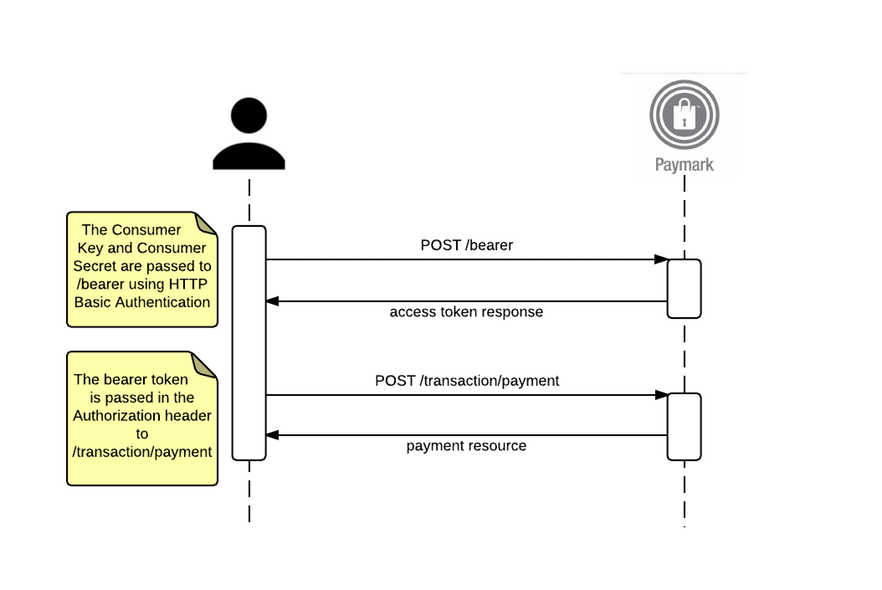
Linked Gateway uses the OAuth 2.0 client credentials flow for authentication. You need to register your app to get a Consumer Key and Consumer Secret. You must protect these credentials.
Obtain oAuth Bearer Token 
Headers
Content-Type: x-www-form-urlencoded
Authorization: Basic dGVzdDp0ZXN0
Body
{
  "grant_type": "client_credentials"
}Headers
Content-Type: application/vnd.paymark_api+json;version=2.0Body
{
  "issued_at": "1614133043705",
  "application_name": "896671b5-e6ee-42f8-a33b-df7fa240a54b",
  "scope": "",
  "status": "approved",
  "expires_in": "3599",
  "token_type": "BearerToken",
  "client_id": "eUU6UB7LeBzyazwzOEmDPANvaKMq4XgR",
  "access_token": "qtAGAWgkARL3rxBaVASwID7RC0KCN"
}
Headers
Content-Type: application/jsonBody
{
  "error": "invalid_client",
  "error_description": "ClientId is Invalid"
}
Obtain oAuth Bearer TokenPOST/bearer
Before calling any Linked Gateway endpoint, you must obtain a Bearer token by issuing a POST to the /bearer endpoint, providing the Consumer Key and Consumer Secret as the username and password respectively, using HTTP Basic authentication, and passing client_credentials as the grant_type.
The bearer token returned must be provided in the Authorization header of all requests to any other endpoints.
The bearer token has a limited lifetime; you will need to obtain a new token once it has expired.
Payment 
Overview
A payment represents a request for a transfer of funds from the Cardholder to the Merchant.
A Merchant must be enabled for payment to send payment requests. Linked Gateway will reject Payment requests if the Merchant has not been enabled for this transaction type by their Acquiring Bank.
v2 vs v3: Use the v3 endpoint if your integration requires Merchant Initiated Transaction (MIT) fields (
transaction.amountVariability,transaction.agreementId,transaction.frequency: "Recurring"/"Unscheduled"). Use v2 for standard card-present or customer-initiated transactions only.For full details on Credential on File (COF) requirements, cardholder agreement setup, and MIT transaction flows, refer to the Linked Gateway Card on File Integration Guide.
| Environment | v2 URL | v3 URL |
|---|---|---|
| Production | https://api.paymark.nz/transaction/payment | https://api.paymark.nz/transaction/v3/payment |
| Sandbox | https://apitest.paymark.nz/transaction/payment | https://apitest.paymark.nz/transaction/v3/payment |
Create Payment
Creates a new payment for processing on the Paymark NZ network. The payment will be processed immediately and the returned resource will communicate whether the payment was approved or declined.
PAYMENT REQUEST
POST /transaction/payment
POST /transaction/v3/payment
Provide a JSON formatted payment resource as per the examples below.
Example Request - Making an eCommerce Payment with Card Data
POST /transaction/v3/payment HTTP/1.1

Authorization: Bearer dGVzdDp0ZXN0

Accept: application/vnd.paymark_api+json;version=2.0

Content-Type: application/vnd.paymark_api+json;version=2.0

{
    "card":{
        "cardNumber":"5123456789012346",
        "expiryDate":"2028-07",
        "cardSecurityCodePresence":"Present",
        "cardSecurityCode":"111"
    },
    "merchant":{
        "cardAcceptorIdCode":"854321",
        "transactionReference":"Test Reference",
        "transactionInformation":"Test Info",
        "timeStamp":"2025-04-14T11:55:04Z"
    },
    "transaction":{
        "amount":5467,
        "source":"Web Site",
        "storedCredentials":"new",
        "settlementDate":"2025-04-15",
        "frequency":"single"
    }
}
Example Request – Making a 3DS Payment
POST /transaction/v3/payment HTTP/1.1

Authorization: Bearer dGVzdDp0ZXN0

Accept: application/vnd.paymark_api+json;version=2.0

Content-Type: application/vnd.paymark_api+json;version=2.0

{
    "card":{
        "cardNumber":"5123456789012346",
        "expiryDate":"2028-07",
        "cardSecurityCodePresence":"Present",
        "cardSecurityCode":"111"
    },
    "merchant":{
        "cardAcceptorIdCode":"854321",
        "transactionReference":"Test Reference",
        "transactionInformation":"Test Info",
        "timeStamp":"2025-04-14T11:55:04Z"
    },
    "transaction":{
        "amount":5649,
        "source":"Web Site"
    },
    "3ds2": {
        "transactionId": "f5064c70-1556-472a-bde1-dd6b45d37be6",
        "eci": "05",
        "authenticationValue": "AAABBEg0VhI0VniQEjRWAAAAAAA=",
        "authenticationStatus": "Y",
        "authenticationStatusReason": "01"
    }
}
Example Request - Making an eCommerce Payment with Scheme Token Data
IMPORTANT When sending SCHEME_TOKEN transaction type for Customer Initiated Transactions the values provided on the following card object fields are:
| Fields | Value Description |
|---|---|
| cardNumber | scheme token DPAN |
| expiryDate | scheme token expiry date |
| eci | scheme token eci value |
| cryptogram | scheme token cryptogram |
SCHEME TOKEN TRANSACTION REQUEST GUIDE
| Field | Visa | Mastercard | AMEX |
|---|---|---|---|
| type | Required | Required | Required |
| cryptogram | Required | Required | - |
| eci | Required | Required | Required |
| cardSecurityCode | - | - | Required |
| expiryDate | Required | Required | Required |
| cardSecurityCodePresence | Required | Required | Required |
POST /transaction/v3/payment HTTP/1.1

Authorization: Bearer dGVzdDp0ZXN0

Accept: application/vnd.paymark_api+json;version=2.0

Content-Type: application/vnd.paymark_api+json;version=2.0

{
    "card":{
        "type": "SCHEME_TOKEN",
        "cardNumber":"5123456789012346",
        "expiryDate":"2028-07",
        "eci": "01",
        "cryptogram": "AwAAAAAAPboI4MoAmZZRghEAAAA=",
        "cardSecurityCodePresence":"Present"
    },
    "merchant":{
        "cardAcceptorIdCode":"854321",
        "transactionReference":"Test Reference",
        "transactionInformation":"Test Info",
        "timeStamp":"2025-04-14T11:55:04Z"
    },
    "transaction":{
        "amount":5467,
        "source":"Web Site",
        "storedCredentials":"stored",
        "settlementDate":"2025-04-15",
        "frequency":"single"
    }
}
Example Request – Customer-Initiated Payment, Storing Card for Future MIT Use (v3)
First transaction in a recurring agreement. Stores card details and establishes the agreement. See the Card on File Integration Guide for full COF compliance requirements.
POST /transaction/v3/payment HTTP/1.1

Authorization: Bearer dGVzdDp0ZXN0

Accept: application/vnd.paymark_api+json;version=2.0

Content-Type: application/vnd.paymark_api+json;version=2.0

{
    "card":{
        "cardNumber":"5123456789012346",
        "expiryDate":"2028-07",
        "cardSecurityCodePresence":"Present",
        "cardSecurityCode":"111"
    },
    "merchant":{
        "cardAcceptorIdCode":"854321",
        "transactionReference":"Test Reference",
        "transactionInformation":"Test Info",
        "timeStamp":"2025-04-14T11:55:04Z"
    },
    "transaction":{
        "amount":5649,
        "source":"Web Site",
        "storedCredentials":"new",
        "frequency":"Recurring",
        "agreementId":"5b29c055-6e8b-4213-a320-834490f747d8",
        "amountVariability":"FIXED"
    }
}
Example Request – Merchant-Initiated Payment Using Stored Card (v3)
Subsequent transaction charged by the merchant without cardholder participation. Requires a previously established agreementId.
POST /transaction/v3/payment HTTP/1.1

Authorization: Bearer dGVzdDp0ZXN0

Accept: application/vnd.paymark_api+json;version=2.0

Content-Type: application/vnd.paymark_api+json;version=2.0

{
    "card":{
        "cardNumber":"5123456789012346",
        "expiryDate":"2028-07",
        "cardSecurityCodePresence":"Not Present"
    },
    "merchant":{
        "cardAcceptorIdCode":"854321",
        "transactionReference":"Test Reference",
        "transactionInformation":"Test Info",
        "timeStamp":"2025-04-14T11:55:04Z"
    },
    "transaction":{
        "amount":5649,
        "source":"Merchant",
        "storedCredentials":"stored",
        "frequency":"Recurring",
        "agreementId":"5b29c055-6e8b-4213-a320-834490f747d8",
        "amountVariability":"FIXED"
    }
}
PAYMENT RESPONSE
If successful, returns HTTP 201 Created with the response body containing the full payment resource as per the example below.
Example Response - Making an eCommerce Payment with Card Data
HTTP/1.1 201 Created

Content-Type: application/vnd.paymark_api+json;version=2.0

{
  "links": [
    {
    "href":"https://apitest.paymark.nz/transaction/payment/ec2b8e9d-2b88-4460-9257-11d7a629b43b",
    "rel": "self"
    }
  ],
  "id":"ec2b8e9d-2b88-4460-9257-11d7a629b43b",
  "status":"complete",
  "creationTime":"2025-04-14T11:55:04.946Z",
  "modificationTime":"2025-04-14T11:55:04.946Z",
  "card": {
    "token":"4ff817be-e6ce-4b66-a797-1a3dce362b3a",
    "maskedNumber":"512345..2346",
    "expiryDate":"2028-07",
    "cardSecurityCodePresence":"Present",
    "cardSecurityCodeResponse":"Not Processed"
  },
  "merchant": {
    "cardAcceptorIdCode":"854321",
    "transactionReference":"Test Reference",
    "transactionInformation":"Test Info",
    "street":"123 The Avenue",
    "suburb":"Auckland Heights",
    "city":"Auckland",
    "postalCode":"1000",
    "country":"NZ",
    "cardAcceptorName":"Greatest BBQ On Earth",
    "acquiringInstitutionId":"503513",
    "mcc":"1234",
    "terminal":"98765432101",
    "timeStamp":"2025-04-14T11:55:04.946Z"
  },
  "transaction": {
    "amount":5467,
    "currency":"NZD",
    "source":"Web Site",
    "frequency":"single",
    "processorResponseCode":"00",
    "settlementDate":"2025-04-15",
    "authorisationCode":"123456",
    "retrievalReferenceNumber":"123456789012",
    "systemTraceAuditNumber":"061610",
    "storedCredentials":"new",
    "gatewayRecommendation": "NO_ACTION",
    "gatewayCode": "APPROVED",
    "gatewayResult": "SUCCESS",
    "merchantAdviceCode": "00"
  }
}
Example Response – Making a 3DS Payment
HTTP/1.1 201 Created

Content-Type: application/vnd.paymark_api+json;version=2.0

{
  "links": [
    {
    "href":"https://apitest.paymark.nz/transaction/payment/4ae27040-1cf7-476f-9537-6089cc1012d",
    "rel": "self"
    }
  ],
  "id":"4ae27040-1cf7-476f-9537-6089cc1012d",
  "status":"complete",
  "creationTime":"2025-04-14T11:55:04Z",
  "modificationTime":"2025-04-14T11:55:04Z",
  "card": {
    // fields as per previous example
  },
  "merchant": {
    // fields as per previous example
  },
  "transaction": {
    // fields as per previous example
  },
  "3ds2": {
    "transactionId": "f5064c70-1556-472a-bde1-dd6b45d37be6",
    "eci": "05",
    "authenticationValue": "AAABBEg0VhI0VniQEjRWAAAAAAA=",
    "authenticationStatus": "Y",
    "authenticationStatusReason": "01",
    "protocolVersion": "2.1.0"
  }
}
Example Response - Making a Scheme Token Payment
HTTP/1.1 201 Created

Content-Type: application/vnd.paymark_api+json;version=2.0

{
  "links": [
    {
    "href":"https://apitest.paymark.nz/transaction/payment/ec2b8e9d-2b88-4460-9257-11d7a629b43b",
    "rel": "self"
    }
  ],
  "id": "ec2b8e9d-2b88-4460-9257-11d7a629b43b",
  "status": "complete",
  "creationTime": "2025-04-14T11:55:04.946Z",
  "modificationTime": "2025-04-14T11:55:04.946Z",
  "card": {
    "maskedNumber": "512345..0008",
    "expiryDate": "2028-07",
    "cardSecurityCodePresence": "Present",
    "cardSecurityCodeResponse": "Not Processed",
    "type": "SCHEME_TOKEN"
  },
  "merchant": {
    // fields as per previous example
  },
  "transaction": {
    "amount": 5649,
    "currency": "NZD",
    "source": "Web Site",
    "frequency": "single",
    "processorResponseCode": "00",
    "settlementDate": "2025-04-15",
    "authorisationCode": "123456",
    "retrievalReferenceNumber": "123456789012",
    "systemTraceAuditNumber": "061610",
    "storedCredentials": "new",
    "agreementId": "5b29c055-6e8b-4213-a320-834490f747d8",
    "gatewayRecommendation": "NO_ACTION",
    "gatewayCode": "APPROVED",
    "gatewayResult": "SUCCESS",
    "merchantAdviceCode": "00"
  }
}
Example Response – Customer-Initiated Payment, First in Recurring Agreement (v3)
HTTP/1.1 201 Created

Content-Type: application/vnd.paymark_api+json;version=2.0

{
  "links": [
    {
    "href":"https://apitest.paymark.nz/transaction/payment/ec2b8e9d-2b88-4460-9257-11d7a629b43b",
    "rel": "self"
    }
  ],
  "id": "ec2b8e9d-2b88-4460-9257-11d7a629b43b",
  "status": "complete",
  "creationTime": "2025-04-14T11:55:04.946Z",
  "modificationTime": "2025-04-14T11:55:04.946Z",
  "card": {
    // fields as per previous example
  },
  "merchant": {
    // fields as per previous example
  },
  "transaction": {
    "amount": 5649,
    "currency": "NZD",
    "source": "Web Site",
    "frequency": "Recurring",
    "processorResponseCode": "00",
    "settlementDate": "2025-04-15",
    "authorisationCode": "123456",
    "retrievalReferenceNumber": "123456789012",
    "systemTraceAuditNumber": "061610",
    "storedCredentials": "new",
    "agreementId": "5b29c055-6e8b-4213-a320-834490f747d8",
    "amountVariability": "FIXED",
    "gatewayRecommendation": "NO_ACTION",
    "gatewayCode": "APPROVED",
    "gatewayResult": "SUCCESS",
    "merchantAdviceCode": "00"
  }
}
Read Payment
Reads a previously created payment. This does not change the payment in any way.
A payment can be read as soon as it has been created even if processing has not yet completed.
A payment can be read if it was created within the past 2 years. Payments performed more than 2 years ago will be archived by Paymark NZ.
READ PAYMENT REQUEST
To request a single payment resource:
GET /transaction/payment/{id}Example Request - Single Payment
GET /transaction/payment/ec2b8e9d-2b88-4460-9257-11d7a629b43b HTTP/1.1

Authorization: Bearer dGVzdDp0ZXN0

Accept: application/vnd.paymark_api+json;version=2.0
READ PAYMENT RESPONSE
If successful, returns HTTP 200 OK with the response body containing a payment resource.
Example Response – Single Payment Resource
HTTP/1.1 200 OK

Content-Type: application/vnd.paymark_api+json;version=2.0

{
  "links": [
    {
    "href":"https://apitest.paymark.nz/transaction/payment/ec2b8e9d-2b88-4460-9257-11d7a629b43b",
    "rel": "self"
    }
  ],
  "id":"ec2b8e9d-2b88-4460-9257-11d7a629b43b",
  "status":"complete",
  "creationTime":"2025-04-14T11:55:04.946Z",
  "modificationTime":"2025-04-14T11:55:04.946Z",
  "card": {
    "token":"4ff817be-e6ce-4b66-a797-1a3dce362b3a",
    "maskedNumber":"512345..2346",
    "expiryDate":"2028-07",
    "cardSecurityCodePresence":"Present",
    "cardSecurityCodeResponse":"Not Processed"
  },
  "merchant": {
    "cardAcceptorIdCode":"854321",
    "transactionReference":"Test Reference",
    "transactionInformation":"Test Info",
    "street":"123 The Avenue",
    "suburb":"Auckland Heights",
    "city":"Auckland",
    "postalCode":"1000",
    "country":"NZ",
    "cardAcceptorName":"Greatest BBQ On Earth",
    "acquiringInstitutionId":"503513",
    "mcc":"1234",
    "terminal":"98765432101",
    "timeStamp":"2025-04-14T11:55:04.946Z"
  },
  "transaction": {
    "amount":5467,
    "currency":"NZD",
    "source":"Web Site",
    "frequency":"instalment",
    "processorResponseCode":"00",
    "settlementDate":"2025-04-15",
    "authorisationCode":"123456",
    "retrievalReferenceNumber":"123456789012",
    "systemTraceAuditNumber":"061610",
    "storedCredentials":"stored",
    "gatewayRecommendation": "NO_ACTION",
    "gatewayCode": "APPROVED",
    "gatewayResult": "SUCCESS",
    "merchantAdviceCode": "00"
  }
}
Query Payments
Reads a range of previously created payments. This does not change the payments in any way.
A payment can be read as soon as it has been created even if processing has not yet completed.
A payment can be read if it was created within the past 2 years. Payments performed more than 2 years ago will be archived by Paymark NZ.
QUERY PAYMENT REQUEST
| Name | Value | Description |
|---|---|---|
| cardAcceptorIdCode | string | Required. cardAcceptorIdCode field of payment resource. |
| status | string | Status field of payment resource. |
| startTime | date/time, ISO 8601 formatted | Minimum value of creation field of payment resource. |
| endTime | date/time, ISO 8601 formatted | Maximum value of creation field of payment resource. |
| transactionReference | string | Merchant reference for a payment. |
To request a range of payment resources:
GET /transaction/payment?cardAcceptorIdCode={cardAcceptorIdCode}&status={status}&startTime={startTime}&endTime={endTime}Example Request
GET /transaction/payment?cardAcceptorIdCode=854321&transactionReference=Test%20Reference HTTP/1.1

Authorization: Bearer dGVzdDp0ZXN0

Accept: application/vnd.paymark_api+json;version=2.0
QUERY PAYMENT RESPONSE
If successful, returns HTTP 200 OK with an array of zero or more payment resources that match the provided query in the response body.
Example Response – Array of Payments
HTTP/1.1 200 OK

Content-Type: application/vnd.paymark_api+json;version=2.0

{
  "links": [
    {
    "href":"https://apitest.paymark.nz/transaction/payment?cardAcceptorIdCode=854321&transactionReference=Test%20Reference",
    "rel": "self"
    },
    {
    "href":"https://apitest.paymark.nz/transaction/payment/ec2b8e9d-2b88-4460-9257-11d7a629b43b",
    "rel": "ec2b8e9d-2b88-4460-9257-11d7a629b43b"
    },
    {
    "href":"https://apitest.paymark.nz/transaction/payment/4ae27040-1cf7-476f-9537-6089cc1012d",
    "rel": "4ae27040-1cf7-476f-9537-6089cc1012d"
    },
    {
    "href":"https://apitest.paymark.nz/transaction/payment/7c018008-624b-4436-b393-dc3ad1b22d1e",
    "rel": "7c018008-624b-4436-b393-dc3ad1b22d1e"
    }
  ],
  "payments": [
    {
    "id":"ec2b8e9d-2b88-4460-9257-11d7a629b43b",
    // remaining fields as per create payment response
    },
    {
    "id":"4ae27040-1cf7-476f-9537-6089cc1012d",
    // remaining fields as per create payment response
    },
    {
    "id":"7c018008-624b-4436-b393-dc3ad1b22d1e",
    // remaining fields as per create payment response
    }
  ]
}
Payment Resource Definition
{
    "links":[
        {
        "href":"full URL in message",
        "rel":"self"
        }
    ],
    "id":"XXXXXXXX-XXXX-XXXX-XXXX-XXXXXXXXXXXX",
    "status":"['created'|'processing'|'complete'|'failed']",
    "creationTime":"YYYY-MM-DDThh:mm:ss.000Z",
    "modificationTime":"YYYY-MM-DDThh:mm:ss.000Z",
    "card":{
        "token":"XXXXXXXX-XXXX-XXXX-XXXX-XXXXXXXXXXXX",
        "cardNumber":4111111111111111,
        "maskedNumber":"XXXXXX..XXXX",
        "expiryDate":"YYYY-MM",
        "cardSecurityCodePresence":"['Not Present'|'Present'|'Not Legible'|'Not Imprinted']",
        "cardSecurityCode":"ABCD",
        "cardSecurityCodeResponse":"['Match'|'No Match'|'Not Processed'|'Not on Card'|'No keys, not certified or both']",
        "type":"['CARD'|'SCHEME_TOKEN']",
        "cryptogram":"XXXXXXXXXXXXXXX",
        "eci":"XX"
    },
    "merchant":{
        "cardAcceptorIdCode":"Paymark NZ assigned merchant ID",
        "transactionReference":"my-unique-ref/01.1",
        "transactionInformation":"Informative Text.",
        "street":"merchant's street address as provided by the bank",
        "suburb":"merchant's address suburb as provided by the bank",
        "city":"merchant's address city as provided by the bank",
        "postalCode":"merchant's address post code as provided by the bank",
        "country":"merchant's address country as provided by the bank",
        "cardAcceptorName":"merchant's trading name as provided by the bank",
        "acquiringInstitutionId":"merchant's acquiring bank code",
        "mcc":"classification code as provided by the bank",
        "terminal":"XXXXXXXX",
        "timeStamp":"YYYY-MM-DDThh:mm:ss.000Z"
    },
    "transaction":{
        "systemTraceAuditNumber":"123456789012",
        "amount":12345,
        "currency":"['AUD'|'NZD'|'USD'|...]",
        "source":"['Web Site'|'Call Centre'|'Merchant']",
        "frequency":"['single'|'recurring'|'instalment'|'Recurring'|'Unscheduled']",
        "processorResponseCode":"00",
        "settlementDate":"YYYY-MM-DD",
        "authorisationCode":"12",
        "retrievalReferenceNumber":"123456789012",
        "storedCredentials":"['new'|'stored']",
        "agreementId":"XXXXXXXXXXXXXXX",
        "amountVariability":"['FIXED'|'VARIABLE']",
        "gatewayRecommendation":"recommended action if transaction declines",
        "gatewayCode":"summary of the operation",
        "gatewayResult":"A system-generated high level overall result of the operation",
        "merchantAdviceCode":"Issuer generated response, acts as a signal for retry or abandonment"
    }
}
Note:
transaction.agreementIdandtransaction.amountVariabilityare v3 endpoint fields only and are not supported on the v2/transaction/paymentendpoint.
Required Fields for Payment
Refer to Field Glossary section for field information.
| Name | Valid Methods | Required? |
|---|---|---|
| id | GET | Yes for read. |
| status | GET | Optional. |
| creationTime | GET | Optional, can specify startTime or endTime in query. |
| card.cardNumber | POST | Yes |
| card.expiryDate | POST | Yes if transaction.frequency is “single”, or if transaction.frequency is “Recurring” and it is the first transaction for that card. |
| card.cardSecurityCodePresence | POST | Yes |
| card.cardSecurityCode | POST | Yes if cardSecurityCodePresence is “Present”. |
| card.type | POST | Yes if transaction type is “SCHEME_TOKEN”. |
| card.cryptogram | POST | Yes if transaction type is “SCHEME_TOKEN”, Customer Initiated Transaction and Visa or Mastercard. |
| card.eci | POST | Yes if transaction type is “SCHEME_TOKEN”, Customer Initiated Transaction and Visa or Mastercard. |
| merchant.cardAcceptorIdCode | POST, GET | Yes |
| merchant.transactionReference | POST, GET | Optional. |
| merchant.transactionInformation | POST | Optional. |
| merchant.timeStamp | POST | Optional. |
| transaction.amount | POST | Yes |
| transaction.source | POST | Optional, uses account default if not present. Set to “Web Site” or “MOTO” for customer-initiated transactions. Set to “Merchant” for merchant-initiated transactions (v3 only). |
| transaction.frequency | POST | Optional, uses account default if not present. Set to “single” for one-off payments or when charging a saved card where the customer initiated the transaction. Set to “Recurring” for a Merchant initiated payment where there is an agreement between a Cardholder and a Merchant to bill the Cardholder’s account on a periodic basis without a specified end date e.g. bill payment or subscription. Set to “Unscheduled” for a Merchant initiated payment that is not on a fixed schedule e.g. account top-ups. Set to “instalment” for a Merchant initiated payment where the number of payments is limited e.g. a purchase split over multiple payments. Note: “Recurring” and “Unscheduled” are v3 endpoint values only. |
| transaction.storedCredentials | POST | Should always be provided for a transaction using a saved (tokenised) card. |
| transaction.agreementId | POST | v3 only. Required for Merchant Initiated Transactions. A unique identifier for the agreement between the Cardholder and Merchant, up to 100 characters. Must be submitted with every transaction under the same agreement. See the Card on File Integration Guide for full details. |
| transaction.amountVariability | POST | v3 only. Required when transaction.frequency is “Recurring”. Indicates whether payments under the agreement are for the same amount or vary. Set to “FIXED” if all payments in the agreement use the same amount (e.g. subscriptions, memberships). Set to “VARIABLE” if the amount differs between payments (e.g. electricity bills, phone bills). |
| transaction.settlementDate | POST | Optional. |
| 3ds2.transactionId | POST | Required when performing a 3DS2 payment. See 3DS2 request/response examples above, or contact lgv2@paymark.co.nz for the full specification. |
| 3ds2.eci | POST | Required when performing a 3DS2 payment. See 3DS2 request/response examples above, or contact lgv2@paymark.co.nz for the full specification. |
| 3ds2.authenticationValue | POST | Required when performing a 3DS2 payment. See 3DS2 request/response examples above, or contact lgv2@paymark.co.nz for the full specification. |
| 3ds2.authenticationStatus | POST | Required when performing a 3DS2 payment. See 3DS2 request/response examples above, or contact lgv2@paymark.co.nz for the full specification. |
| 3ds2.authenticationStatusReason | POST | Required when performing a 3DS2 payment. See 3DS2 request/response examples above, or contact lgv2@paymark.co.nz for the full specification. |
| 3ds2.protocolVersion | POST | Required when performing a 3DS2 payment. See 3DS2 request/response examples above, or contact lgv2@paymark.co.nz for the full specification. |
Refund 
Overview
A refund represents a request for a transfer of funds from a Merchant to a Cardholder. A refund may be standalone or may be linked to a previous payment or capture.
A Merchant must be enabled for refund to send refund requests. Linked Gateway will reject refund requests if the Merchant has not been enabled for this transaction type by their Acquiring Bank.
Notes:
-
You should only attempt to refund a transaction that is less than six months old: there may be issues with the correct Cardholder receiving funds for transactions older than six months.
-
It is the client’s responsibility to ensure the refund amount does not exceed the original payment amount.
-
If explicitly passing a reference for the refund request, the response will return the previous payment or previous capture reference.
-
Scheme tokenisation standalone refund request is currently not implemented.
-
Refer to the table below when refunding a previous payment or previous capture.
| Field Name | Value | Description |
|---|---|---|
| paymentId | UUID | Use if refunding a prior payment. |
| captureId | UUID | Use if refunding a prior captured transaction. |
| Environment | v2 URL | v3 URL |
|---|---|---|
| Production | https://api.paymark.nz/transaction/refund | https://api.paymark.nz/transaction/v3/refund |
| Sandbox | https://apitest.paymark.nz/transaction/refund | https://apitest.paymark.nz/transaction/v3/refund |
Create Refund
Creates a new refund for processing on the Paymark NZ network. The refund will be processed immediately and the returned resource will communicate whether the refund was approved or declined.
REFUND REQUEST
POST /transaction/refundProvide a JSON formatted refund resource as per the examples below.
Example Request – Standalone Refund with Card Details
POST /transaction/refund HTTP/1.1

Authorization: Bearer dGVzdDp0ZXN0

Accept: application/vnd.paymark_api+json;version=2.0

Content-Type: application/vnd.paymark_api+json;version=2.0

{
  "card": {
    "cardNumber":"5123456789012346",
    "expiryDate":"2028-07"
  },
  "merchant": {
    "cardAcceptorIdCode":"854321",
    "transactionReference":"test reference",
    "transactionInformation":"test information",
    "timeStamp":"2025-06-10T02:34:24.841Z"
  },
  "transaction": {
    "amount":5467,
    "source":"Web Site",
    "settlementDate":"2025-06-11"
  }
}
Example Request – Full Refund Linked to Prior Payment
Creating a refund for the full amount of a prior payment, where the ID of the prior payment is ec2b8e9d-2b88-4460-9257-11d7a629b43b and the payment was for $50. Note: The refund amount should not exceed the original payment amount.
Note: For linked refunds, card data is not required — use the
paymentIdorcaptureIdto reference the original transaction.
POST /transaction/refund HTTP/1.1

Authorization: Bearer dGVzdDp0ZXN0

Accept: application/vnd.paymark_api+json;version=2.0

Content-Type: application/vnd.paymark_api+json;version=2.0

{
    "paymentId": "ec2b8e9d-2b88-4460-9257-11d7a629b43b",
    "transaction": {
      "amount": 5000
    }
}
Example Request – Partial Refund Linked to Prior Capture
Creating a refund for a portion ($20) of the amount of a prior capture ($54.67), where the ID of the prior capture is 8312422d-b42d-47f9-adf1-e468669d134b.
POST /transaction/refund HTTP/1.1

Authorization: Bearer dGVzdDp0ZXN0

Accept: application/vnd.paymark_api+json;version=2.0

Content-Type: application/vnd.paymark_api+json;version=2.0

{
    "captureId": "8312422d-b42d-47f9-adf1-e468669d134b",
    "transaction": {
      "amount": 2000
    }
}
REFUND RESPONSE
If successful, returns HTTP 201 Created with the response body containing the full refund resource.
Example Response – Standalone Refund with Card Details
HTTP/1.1 201 Created

Content-Type: application/vnd.paymark_api+json;version=2.0

{
  "links": [
    {
    "href":"https://apitest.paymark.nz/transaction/refund/c04a47b2-bf35-4fcb-b1e9-ddaa11364cba",
    "rel": "self"
    }
  ],
  "id":"c04a47b2-bf35-4fcb-b1e9-ddaa11364cba",
  "status":"complete",
  "creationTime":"2025-06-10T02:38:39.021Z",
  "modificationTime":"2025-06-10T02:38:39.021Z",
  "card": {
    "token":"89d74cec-b9c4-43ce-a762-89b166609aa1",
    "maskedNumber":"512345..2346",
    "expiryDate":"2028-07",
    "cardSecurityCodePresence":"Present",
    "cardSecurityCodeResponse":"Not Processed"
  },
  "merchant": {
    "cardAcceptorIdCode":"854321",
    "transactionReference":"test reference",
    "transactionInformation":"test information",
    "street":"123 The Avenue",
    "suburb":"Auckland Heights",
    "city":"Auckland",
    "postalCode":"1000",
    "country":"NZ",
    "cardAcceptorName":"Carls Carpentry Cooperative",
    "acquiringInstitutionId":"503513",
    "mcc":"1234",
    "terminal":"98765432101",
    "timeStamp":"2025-06-10T02:34:24.841Z"
  },
  "transaction": {
    "amount":5467,
    "currency":"NZD",
    "source":"Web Site",
    "frequency":"single",
    "processorResponseCode":"00",
    "settlementDate":"2025-06-11",
    "authorisationCode":"123456",
    "retrievalReferenceNumber":"123456",
    "systemTraceAuditNumber":"123456",
    "gatewayCode": "APPROVED",
    "gatewayResult": "SUCCESS",
    "merchantAdviceCode": "00"
  }
}
Read Refund
Reads a previously created refund. This does not change the refund in any way.
A refund can be read as soon as it has been created even if processing has not yet completed.
A refund can be read if it was created within the past 2 years. Refunds performed more than 2 years ago will be archived by Paymark NZ.
READ REFUND REQUEST
To request a single refund resource:
GET /transaction/refund/{id}Example Request - Single Refund
GET /transaction/refund/c04a47b2-bf35-4fcb-b1e9-ddaa11364cba HTTP/1.1

Authorization: Bearer dGVzdDp0ZXN0

Accept: application/vnd.paymark_api+json;version=2.0
READ REFUND RESPONSE
If successful, returns HTTP 200 OK with the response body containing a refund resource.
Example Response – Single Refund Resource
HTTP/1.1 200 OK

Content-Type: application/vnd.paymark_api+json;version=2.0

{
  "links": [
    {
    "href":"https://apitest.paymark.nz/transaction/refund/c04a47b2-bf35-4fcb-b1e9-ddaa11364cba",
    "rel": "self"
    }
  ],
  "id":"c04a47b2-bf35-4fcb-b1e9-ddaa11364cba",
  "status":"complete",
  "creationTime":"2025-06-10T02:38:39.021Z",
  "modificationTime":"2025-06-10T02:38:39.021Z",
  "card": {
    "token":"89d74cec-b9c4-43ce-a762-89b166609aa1",
    "maskedNumber":"512345..2346",
    "expiryDate":"2028-07",
    "cardSecurityCodePresence":"Present",
    "cardSecurityCodeResponse":"Not Processed"
  },
  "merchant": {
    "cardAcceptorIdCode":"854321",
    "transactionReference":"test reference",
    "transactionInformation":"test information",
    "street":"123 The Avenue",
    "suburb":"Auckland Heights",
    "city":"Auckland",
    "postalCode":"1000",
    "country":"NZ",
    "cardAcceptorName":"Carls Carpentry Cooperative",
    "acquiringInstitutionId":"503513",
    "mcc":"1234",
    "terminal":"98765432101",
    "timeStamp":"2025-06-10T02:38:39.021Z"
  },
  "transaction": {
    "amount":5467,
    "currency":"NZD",
    "source":"Web Site",
    "frequency":"single",
    "processorResponseCode":"00",
    "settlementDate":"2025-06-11",
    "authorisationCode":"123456",
    "retrievalReferenceNumber":"123456",
    "systemTraceAuditNumber":"123456",
    "gatewayCode": "APPROVED",
    "gatewayResult": "SUCCESS",
    "merchantAdviceCode": "00"
  }
}
Query Refunds
Reads a range of previously created refunds. This does not change the refunds in any way.
A refund can be read as soon as it has been created even if processing has not yet completed.
A refund can be read if it was created within the past 2 years. Refunds performed more than 2 years ago will be archived by Paymark NZ.
QUERY REFUND REQUEST
| Name | Value | Description |
|---|---|---|
| cardAcceptorIdCode | string | Required. cardAcceptorIdCode field of refund resource. |
| status | string | Status field of refund resource. |
| startTime | date/time, ISO 8601 formatted | Minimum value of creation field of refund resource. |
| endTime | date/time, ISO 8601 formatted | Maximum value of creation field of refund resource. |
| transactionReference | string | Merchant reference for a refund. |
To request a range of refund resources:
GET /transaction/refund?cardAcceptorIdCode={cardAcceptorIdCode}&startTime={startTime}&endTime={endTime}&status={status}Example Request
GET /transaction/refund?cardAcceptorIdCode=854321&startTime=2025-05-13 HTTP/1.1

Authorization: Bearer dGVzdDp0ZXN0

Accept: application/vnd.paymark_api+json;version=2.0
QUERY REFUND RESPONSE
If successful, returns HTTP 200 OK with the response body. The response body is similar to that shown under Query Payments, with an array of zero or more refund resources that match the provided query.
Refund Resource Definition
{
    "links":[
        {
        "href":"full URL in message",
        "rel":"self"
        }
    ],
    "id":"XXXXXXXX-XXXX-XXXX-XXXX-XXXXXXXXXXXX",
    "status":"['created'|'processing'|'complete'|'failed']",
    "creationTime":"YYYY-MM-DDThh:mm:ss.000Z",
    "modificationTime":"YYYY-MM-DDThh:mm:ss.000Z",
    "card":{
        "token":"XXXXXXXX-XXXX-XXXX-XXXX-XXXXXXXXXXXX",
        "cardNumber":4111111111111111,
        "maskedNumber":"XXXXXX..XXXX",
        "expiryDate":"YYYY-MM",
        "cardSecurityCodePresence":"['Not Present'|'Present'|'Not Legible'|'Not Imprinted']",
        "cardSecurityCode":"ABCD",
        "cardSecurityCodeResponse":"['Match'|'No Match'|'Not Processed'|'Not on Card'|'No keys, not certified or both']",
        "type":"['CARD'|'SCHEME_TOKEN']",
        "cryptogram":"XXXXXXXXXXXXXXX",
        "eci":"XX"
    },
    "merchant":{
        "cardAcceptorIdCode":"Paymark NZ assigned merchant ID",
        "transactionReference":"my-unique-ref/01.1",
        "transactionInformation":"Informative Text.",
        "street":"merchant's street address as provided by the bank",
        "suburb":"merchant's address suburb as provided by the bank",
        "city":"merchant's address city as provided by the bank",
        "postalCode":"merchant's address post code as provided by the bank",
        "country":"merchant's address country as provided by the bank",
        "cardAcceptorName":"merchant's trading name as provided by the bank",
        "acquiringInstitutionId":"merchant's acquiring bank code",
        "mcc":"classification code as provided by the bank",
        "terminal":"XXXXXXXX",
        "timeStamp":"YYYY-MM-DDThh:mm:ss.000Z"
    },
    "transaction":{
        "systemTraceAuditNumber":"123456789012",
        "amount":12345,
        "currency":"['AUD'|'NZD'|'USD'|...]",
        "source":"['Web Site'|'Call Centre']",
        "frequency":"['single'|'recurring'|'instalment']",
        "processorResponseCode":"00",
        "settlementDate":"YYYY-MM-DD",
        "authorisationCode":"12",
        "retrievalReferenceNumber":"123456789012",
        "storedCredentials":"['new'|'stored']",
        "gatewayRecommendation":"recommended action if transaction declines",
        "gatewayCode":"summary of the operation",
        "gatewayResult":"A system-generated high level overall result of the operation",
        "merchantAdviceCode":"Issuer generated response, acts as a signal for retry or abandonment"
    }
}
Required Fields for Refund
Refer to Field Glossary section for field information.
| Name | Valid Methods | Required? |
|---|---|---|
| id | GET | Yes for read. |
| status | GET | Optional. |
| creationTime | GET | Optional, can specify startTime or endTime in query. |
| card.cardNumber | POST | Yes for standalone refunds. Not required for linked refunds (where paymentId or captureId is provided). |
| card.expiryDate | POST | Yes for standalone refunds if transaction.frequency is “single”. Not required for linked refunds. |
| paymentId | POST | Yes if refunding a prior payment. Mutually exclusive with captureId and card data. |
| captureId | POST | Yes if refunding a prior capture. Mutually exclusive with paymentId and card data. |
| merchant.cardAcceptorIdCode | POST, GET | Yes |
| merchant.transactionReference | POST, GET | Optional. |
| merchant.transactionInformation | POST | Optional. |
| merchant.timeStamp | POST | Optional. |
| transaction.amount | POST | Yes |
| transaction.source | POST | Optional, uses account default if not present. |
| transaction.settlementDate | POST | Optional. |
Status Check 
Overview
A status check enables a Merchant to verify a card, without reserving any Cardholder funds. This is suitable when saving a card that will be used for charging at a later time.
A Merchant must be enabled for “authorisation” to send status check requests: the status check leverages the authorisation feature. Linked Gateway will reject status check requests if the Merchant has not been enabled for the authorisation transaction type by their Acquiring Bank.
Notes:
- Scheme tokenisation transaction request for Status Check is currently not implemented.
| Environment | v2 URL | v3 URL |
|---|---|---|
| Production | https://api.paymark.nz/transaction/status | https://api.paymark.nz/transaction/v3/status |
| Sandbox | https://apitest.paymark.nz/transaction/status | https://apitest.paymark.nz/transaction/v3/status |
Create Status Check
Creates a new status check for processing on the Paymark NZ network. The status check will be processed immediately and the returned resource will communicate whether the status check was successful.
STATUS CHECK REQUEST
POST /transaction/statusProvide a JSON formatted status check resource as per the example below.
Example Request – Creating a Status Check
POST /transaction/status HTTP/1.1

Authorization: Bearer dGVzdDp0ZXN0

Accept: application/vnd.paymark_api+json;version=2.0

Content-Type: application/vnd.paymark_api+json;version=2.0

{
    "card": {
        "cardNumber":"5123456789012346",
        "expiryDate":"2028-01",
        "cardHolderName":"Pam Ark",
        "cardSecurityCodePresence":"Present",
        "cardSecurityCode":"111"
    },
    "merchant": {
        "cardAcceptorIdCode":"850525",
        "transactionReference":"status check reference",
        "transactionInformation":"status check information",
        "timeStamp":"2025-02-21T03:05:39.289Z"
    },
    "transaction": {
        "source":"Web Site",
        "storedCredentials":"new"
    }
}
Example Request – Establishing a Recurring Agreement via Status Check (v3)
Use this when the merchant does not intend to charge the cardholder at the point of agreement creation. The status check becomes the first transaction in the agreement.
POST /transaction/v3/status HTTP/1.1

Authorization: Bearer dGVzdDp0ZXN0

Accept: application/vnd.paymark_api+json;version=2.0

Content-Type: application/vnd.paymark_api+json;version=2.0

{
    "card": {
        "cardNumber":"5123456789012346",
        "expiryDate":"2028-01",
        "cardHolderName":"Pam Ark",
        "cardSecurityCodePresence":"Present",
        "cardSecurityCode":"111"
    },
    "merchant": {
        "cardAcceptorIdCode":"850525",
        "transactionReference":"status check reference",
        "transactionInformation":"status check information",
        "timeStamp":"2025-02-21T03:05:39.289Z"
    },
    "transaction": {
        "amount":0,
        "source":"Web Site",
        "storedCredentials":"new",
        "frequency":"Recurring",
        "agreementId":"5b29c055-6e8b-4213-a320-834490f747d8",
        "amountVariability":"FIXED"
    }
}
STATUS CHECK RESPONSE
If successful, returns HTTP 201 Created with the response body containing the full status check resource.
Example Response – Status Check
HTTP/1.1 201 Created

Content-Type: application/vnd.paymark_api+json;version=2.0

{
  "links": [
    {
    "href":"https://apitest.paymark.nz/transaction/status/76a1c90c-54c9-4588-8930-4a9b29f0d81b",
    "rel":"self"
    }
  ],
  "id":"76a1c90c-54c9-4588-8930-4a9b29f0d81b",
  "status":"complete",
  "creationTime":"2025-02-21T03:05:39.367Z",
  "modificationTime":"2025-02-21T03:05:39.367Z",
  "card": {
    "token":"1ac18c74-cead-4246-a56e-d87dee4b6866",
    "maskedNumber":"512345..2346",
    "expiryDate":"2028-01",
    "cardHolderName":"Pam Ark",
    "cardSecurityCodePresence":"Present",
    "cardSecurityCodeResponse":"Not Processed"
  },
  "merchant": {
    "cardAcceptorIdCode":"850525",
    "transactionReference":"status check reference",
    "transactionInformation":"status check information",
    "street":"5 The Parade",
    "suburb":"Christchurch Valley",
    "city":"Christchurch",
    "postalCode":"8000",
    "country":"NZ",
    "cardAcceptorName":"Saisais Sushi",
    "acquiringInstitutionId": "503513",
    "mcc":"1234",
    "terminal":"85052501",
    "timeStamp":"2025-02-21T03:05:39.289Z"
  },
  "transaction": {
    "currency":"NZD",
    "source":"Web Site",
    "frequency":"single",
    "processorResponseCode":"00",
    "settlementDate":"2025-02-21",
    "authorisationCode":"145430",
    "retrievalReferenceNumber":"457897624042",
    "systemTraceAuditNumber":"567351",
    "storedCredentials":"new",
    "gatewayRecommendation": "NO_ACTION",
    "gatewayCode": "APPROVED",
    "gatewayResult": "SUCCESS",
    "merchantAdviceCode": "00"
  }
}
Read Status Check
Reads a previously created status check. This does not change the status check in any way.
A status check can be read as soon as it has been created even if processing has not yet completed.
A status check can be read if it was created within the past 2 years. Status checks performed more than 2 years ago will be archived by Paymark NZ.
READ STATUS CHECK REQUEST
To request a single status check resource:
GET /transaction/status/{id}Example Request - Single Status Check
GET /transaction/status/76a1c90c-54c9-4588-8930-4a9b29f0d81b HTTP/1.1

Authorization: Bearer dGVzdDp0ZXN0

Accept: application/vnd.paymark_api+json;version=2.0
READ STATUS CHECK RESPONSE
If successful, returns HTTP 200 OK with the response body containing a status check resource.
Example Response – Single Status Check Resource
HTTP/1.1 200 OK

Content-Type: application/vnd.paymark_api+json;version=2.0

{
  "links": [
    {
    "href":"https://apitest.paymark.nz/transaction/status/76a1c90c-54c9-4588-8930-4a9b29f0d81b",
    "rel":"self"
    }
  ],
  "id":"76a1c90c-54c9-4588-8930-4a9b29f0d81b",
  "status":"complete",
  "creationTime":"2025-02-21T03:05:39.367Z",
  "modificationTime":"2025-02-21T03:05:39.367Z",
  "card": {
    "token":"1ac18c74-cead-4246-a56e-d87dee4b6866",
    "maskedNumber":"512345..2346",
    "expiryDate":"2028-01",
    "cardHolderName":"Pam Ark",
    "cardSecurityCodePresence":"Present",
    "cardSecurityCodeResponse":"Not Processed"
  },
  "merchant": {
    "cardAcceptorIdCode":"850525",
    "transactionReference":"status check reference",
    "transactionInformation":"status check information",
    "street":"5 The Parade",
    "suburb":"Christchurch Valley",
    "city":"Christchurch",
    "postalCode":"8000",
    "country":"NZ",
    "cardAcceptorName":"Saisais Sushi",
    "acquiringInstitutionId": "503513",
    "mcc":"1234",
    "terminal":"85052501",
    "timeStamp":"2025-02-21T03:05:39.289Z"
  },
  "transaction": {
    "currency":"NZD",
    "source":"Web Site",
    "frequency":"single",
    "processorResponseCode":"00",
    "settlementDate":"2025-02-21",
    "authorisationCode":"145430",
    "retrievalReferenceNumber":"457897624042",
    "systemTraceAuditNumber":"567351",
    "storedCredentials":"new",
    "gatewayRecommendation": "NO_ACTION",
    "gatewayCode": "APPROVED",
    "gatewayResult": "SUCCESS",
    "merchantAdviceCode": "00"
  }
}
Query Status Check
Reads a range of previously created status checks. This does not change the status checks in any way.
A status check can be read as soon as it has been created even if processing has not yet completed.
A status check can be read if it was created within the past 2 years. Status checks performed more than 2 years ago will be archived by Paymark NZ.
QUERY STATUS CHECK REQUEST
| Name | Value | Description |
|---|---|---|
| cardAcceptorIdCode | string | Required. cardAcceptorIdCode field of status check resource. |
| status | string | Status field of status check resource. |
| startTime | date/time, ISO 8601 formatted | Minimum value of creation field of status check resource. |
| endTime | date/time, ISO 8601 formatted | Maximum value of creation field of status check resource. |
| transactionReference | string | Merchant reference for a status check. |
To request a range of status check resources:
GET /transaction/status?cardAcceptorIdCode={cardAcceptorIdCode}&status={status}&startTime={startTime}&endTime={endTime}&transactionReference={transactionReference}Example Request
GET /transaction/status?cardAcceptorIdCode=850525&transactionReference=statusCheckReference HTTP/1.1

Authorization: Bearer dGVzdDp0ZXN0

Accept: application/vnd.paymark_api+json;version=2.0
QUERY STATUS CHECK RESPONSE
If successful, returns HTTP 200 OK with an array of zero or more status check resources that match the provided query in the response body.
Example Response – Array of Status Checks
HTTP/1.1 200 OK

Content-Type: application/vnd.paymark_api+json;version=2.0

{
  "links": [
    {
    "href":"https://apitest.paymark.nz/transaction/status?cardAcceptorIdCode=850525&transactionReference=status%20check%20reference",
    "rel": "self"
    },
    {
    "href":"https://apitest.paymark.nz/transaction/status/76a1c90c-54c9-4588-8930-4a9b29f0d81b",
    "rel": "76a1c90c-54c9-4588-8930-4a9b29f0d81b"
    },
    {
    "href":"https://apitest.paymark.nz/transaction/status/8b61c137-2a72-42cd-87c5-4a9f021955ba",
    "rel": "8b61c137-2a72-42cd-87c5-4a9f021955ba"
    }
  ],
  "statuses": [
    {
    "id":"76a1c90c-54c9-4588-8930-4a9b29f0d81b",
    // remaining fields as per create status check response
    },
    {
    "id":"8b61c137-2a72-42cd-87c5-4a9f021955ba",
    // remaining fields as per create status check response
    }
  ]
}
Status Check Resource Definition
{
    "links":[
        {
        "href":"full URL in message",
        "rel":"self"
        }
    ],
    "id":"XXXXXXXX-XXXX-XXXX-XXXX-XXXXXXXXXXXX",
    "status":"['created'|'processing'|'complete'|'failed']",
    "creationTime":"YYYY-MM-DDThh:mm:ss.000Z",
    "modificationTime":"YYYY-MM-DDThh:mm:ss.000Z",
    "card": {
        "token":"XXXXXXXX-XXXX-XXXX-XXXX-XXXXXXXXXXXX",
        "cardNumber":4111111111111111,
        "maskedNumber":"XXXXXX..XXXX",
        "expiryDate":"YYYY-MM",
        "cardHolderName":"Joe Bloggs",
        "cardSecurityCodePresence":"['Not Present'|'Present'|'Not Legible'|'Not Imprinted']",
        "cardSecurityCode":"XXXX",
        "cardSecurityCodeResponse":"['Match'|'No Match'|'Not Processed'|'Not on Card'|'No keys, not certified or both']"
    },
    "merchant": {
        "cardAcceptorIdCode":"Paymark NZ assigned merchant ID",
        "transactionReference":"my-unique-ref/01.1",
        "transactionInformation":"Informative Text.",
        "street":"merchant's street address as provided by the bank",
        "suburb":"merchant's address suburb as provided by the bank",
        "city":"merchant's address city as provided by the bank",
        "postalCode":"merchant's address post code as provided by the bank",
        "country":"merchant's address country as provided by the bank",
        "cardAcceptorName":"merchant's trading name as provided by the bank",
        "acquiringInstitutionId":"merchant's acquiring bank code",
        "mcc":"classification code as provided by the bank",
        "terminal":"XXXXXXXX",
        "timeStamp":"YYYY-MM-DDThh:mm:ss.000Z"
    },
    "transaction": {
        "currency":"['AUD'|'NZD'|'USD'|...]",
        "source":"['Web Site'|'Call Centre']",
        "frequency":"['single'|'recurring']",
        "processorResponseCode":"00",
        "settlementDate":"YYYY-MM-DD",
        "authorisationCode":"123456",
        "retrievalReferenceNumber":"123456789012",
        "systemTraceAuditNumber":"123456789012",
        "storedCredentials":"['new'|'stored']",
        "gatewayRecommendation":"recommended action if transaction declines",
        "gatewayCode":"summary of the operation",
        "gatewayResult":"A system-generated high level overall result of the operation",
        "merchantAdviceCode":"Issuer generated response, acts as a signal for retry or abandonment"
    }
}
Required Fields for Status Check
Refer to Field Glossary section for field information.
| Name | Valid Methods | Required? |
|---|---|---|
| id | GET | Yes for read. |
| status | GET | Optional. |
| creationTime | GET | Optional, can specify startTime or endTime in query. |
| card.cardNumber | POST | Yes |
| card.expiryDate | POST | Yes if transaction.frequency is “single”. |
| card.cardHolderName | POST | Yes |
| card.cardSecurityCodePresence | POST | Yes |
| card.cardSecurityCode | POST | Yes if cardSecurityCodePresence is “Present”. |
| merchant.cardAcceptorIdCode | POST, GET | Yes |
| merchant.transactionReference | POST, GET | Optional. |
| merchant.transactionInformation | POST | Optional. |
| merchant.timeStamp | POST | Optional. |
| transaction.source | POST | Optional, uses account default if not present. |
| transaction.storedCredentials | POST | Should always be provided for a transaction using a saved (tokenised) card. |
Capture 
Overview
A capture relates to a matching authorisation, resulting in a transfer of funds from the Cardholder to the Merchant.
A Merchant must be enabled for capture to send capture requests. Linked Gateway will reject capture requests if the Merchant has not been enabled for this transaction type by their Acquiring Bank.
Notes:
-
All authorisations must have a corresponding capture(s) or cancellation transaction.
-
If a capture is done, no cancellation is needed (or possible).
-
If explicitly passing a reference for the capture request, the response will return the reference used for prior authorisation.
-
Linked Gateway does not enforce a limit on the total amount captured. The capture may be for the whole value of the authorisation, or for part of the value. It is the client’s responsibility to ensure the total of all captures against an authorisation is not greater than the original authorisation amount.
| Environment | v2 URL | v3 URL |
|---|---|---|
| Production | https://api.paymark.nz/transaction/capture | https://api.paymark.nz/transaction/v3/capture |
| Sandbox | https://apitest.paymark.nz/transaction/capture | https://apitest.paymark.nz/transaction/v3/capture |
Create Capture
Creates a new capture for processing on the Paymark NZ network. The capture must reference a previous authorisation, and the total amount of all captures created must be no more than the amount of the original authorisation.
The capture will be processed immediately and the returned resource will communicate whether the capture was approved or declined.
CAPTURE REQUEST
POST /transaction/captureProvide a JSON formatted capture resource as per the examples below.
Example Request – Interim Capture for $8.00 (Authorisation was for $10.00)
POST /transaction/capture HTTP/1.1

Authorization: Bearer dGVzdDp0ZXN0

Accept: application/vnd.paymark_api+json;version=2.0

Content-Type: application/vnd.paymark_api+json;version=2.0

{
    "authorisationId":"5296a82d-8b05-40a6-b33e-2038c8670b3a",
    "transaction": {
        "amount":800,
        "conditionIndicator":"Partial"
    }
}
Example Request – Final Capture for $2.00 (Authorisation was for $10.00)
POST /transaction/capture HTTP/1.1

Authorization: Bearer dGVzdDp0ZXN0

Accept: application/vnd.paymark_api+json;version=2.0

Content-Type: application/vnd.paymark_api+json;version=2.0

{
    "authorisationId":"5296a82d-8b05-40a6-b33e-2038c8670b3a",
    "transaction": {
        "amount":200,
        "conditionIndicator":"Final",
        "settlementDate":"2025-05-28"
    }
}
CAPTURE RESPONSE
If successful, returns HTTP 201 Created with the response body containing the full capture resource.
Example Response – Interim Capture for $8.00
HTTP/1.1 201 Created

Content-Type: application/vnd.paymark_api+json;version=2.0

{
  "links": [
    {
    "href":"https://apitest.paymark.nz/transaction/capture/dfdf6f47-462e-442c-89b7-240e82166672",
    "rel":"self"
    }
  ],
  "id":"dfdf6f47-462e-442c-89b7-240e82166672",
  "status":"complete",
  "creationTime":"2025-05-27T01:27:03.763Z",
  "modificationTime":"2025-05-27T01:27:03.763Z",
  "card": {
    "token":"1ac18c74-cead-4246-a56e-d87dee4b6866",
    "maskedNumber":"512345..2346",
    "expiryDate":"2028-01"
  },
  "merchant": {
    "cardAcceptorIdCode":"850525",
    "transactionReference":"auth reference",
    "transactionInformation":"auth information",
    "street":"5 The Parade",
    "suburb":"Christchurch Valley",
    "city":"Christchurch",
    "postalCode":"8000",
    "country":"NZ",
    "cardAcceptorName":"Saisais Sushi",
    "acquiringInstitutionId": "503513",
    "mcc":"1234",
    "terminal":"85052501",
    "timeStamp":"2025-05-27T01:27:03.763Z"
  },
  "transaction": {
    "amount":800,
    "currency":"NZD",
    "source":"Web Site",
    "frequency":"single",
    "processorResponseCode":"00",
    "settlementDate":"2025-05-27",
    "authorisationCode":"123456",
    "retrievalReferenceNumber":"123456789012",
    "systemTraceAuditNumber": "061683",
    "conditionIndicator":"Partial",
    "gatewayRecommendation": "NO_ACTION",
    "gatewayCode": "APPROVED",
    "gatewayResult": "SUCCESS",
    "merchantAdviceCode": "00"
  }
}
Example Response – Final Capture for $2.00
HTTP/1.1 201 Created

Content-Type: application/vnd.paymark_api+json;version=2.0

{
  "links": [
    {
    "href":"https://apitest.paymark.nz/transaction/capture/5c23d9bd-b4eb-416c-aa0b-ce8d3350e259",
    "rel":"self"
    }
  ],
  "id":"5c23d9bd-b4eb-416c-aa0b-ce8d3350e259",
  "status":"complete",
  "creationTime":"2025-05-27T04:27:03.763Z",
  "modificationTime":"2025-05-27T04:27:03.763Z",
  "card": {
    "token":"1ac18c74-cead-4246-a56e-d87dee4b6866",
    "maskedNumber":"512345..2346",
    "expiryDate":"2028-01"
  },
  "merchant": {
    "cardAcceptorIdCode":"850525",
    "transactionReference":"auth reference",
    "transactionInformation":"auth information",
    "street":"5 The Parade",
    "suburb":"Christchurch Valley",
    "city":"Christchurch",
    "postalCode":"8000",
    "country":"NZ",
    "cardAcceptorName":"Saisais Sushi",
    "acquiringInstitutionId": "503513",
    "mcc":"1234",
    "terminal":"85052501",
    "timeStamp":"2025-05-27T04:27:03.763Z"
  },
  "transaction": {
    "amount":200,
    "currency":"NZD",
    "source":"Web Site",
    "frequency":"single",
    "processorResponseCode":"00",
    "settlementDate":"2025-05-28",
    "authorisationCode":"123456",
    "retrievalReferenceNumber":"123456789012",
    "systemTraceAuditNumber": "061683",
    "conditionIndicator":"Final",
    "gatewayRecommendation": "NO_ACTION",
    "gatewayCode": "APPROVED",
    "gatewayResult": "SUCCESS",
    "merchantAdviceCode": "00"
  }
}
Read Capture
Reads a previously created capture. This does not change the capture in any way.
A capture can be read as soon as it has been created even if processing has not yet completed.
A capture can be read if it was created within the past 2 years. Captures performed more than 2 years ago will be archived by Paymark NZ.
READ CAPTURE REQUEST
To request a single capture resource:
GET /transaction/capture/{id}Example Request - Single Capture
GET /transaction/capture/dfdf6f47-462e-442c-89b7-240e82166672 HTTP/1.1

Authorization: Bearer dGVzdDp0ZXN0

Accept: application/vnd.paymark_api+json;version=2.0
READ CAPTURE RESPONSE
If successful, returns HTTP 200 OK with the response body containing a capture resource.
Example Response – Single Capture Resource
HTTP/1.1 200 OK

Content-Type: application/vnd.paymark_api+json;version=2.0

{
  "links": [
    {
    "href":"https://apitest.paymark.nz/transaction/capture/dfdf6f47-462e-442c-89b7-240e82166672",
    "rel":"self"
    }
  ],
  "id":"dfdf6f47-462e-442c-89b7-240e82166672",
  "status":"complete",
  "creationTime":"2025-05-27T01:27:03.763Z",
  "modificationTime":"2025-05-27T01:27:03.763Z",
  "card": {
    "token":"1ac18c74-cead-4246-a56e-d87dee4b6866",
    "maskedNumber":"512345..2346",
    "expiryDate":"2028-01"
  },
  "merchant": {
    "cardAcceptorIdCode":"850525",
    "transactionReference":"auth reference",
    "transactionInformation":"auth information",
    "street":"5 The Parade",
    "suburb":"Christchurch Valley",
    "city":"Christchurch",
    "postalCode":"8000",
    "country":"NZ",
    "cardAcceptorName":"Saisais Sushi",
    "acquiringInstitutionId": "503513",
    "mcc":"1234",
    "terminal":"85052501",
    "timeStamp":"2025-05-27T01:27:03.763Z"
  },
  "transaction": {
    "amount":800,
    "currency":"NZD",
    "source":"Web Site",
    "frequency":"single",
    "processorResponseCode":"00",
    "settlementDate":"2025-05-27",
    "authorisationCode":"123456",
    "retrievalReferenceNumber":"123456789012",
    "systemTraceAuditNumber": "061683",
    "conditionIndicator":"Partial",
    "gatewayRecommendation": "NO_ACTION",
    "gatewayCode": "APPROVED",
    "gatewayResult": "SUCCESS",
    "merchantAdviceCode": "00"
  }
}
Query Captures
Reads a range of previously created captures. This does not change the captures in any way.
A capture can be read as soon as it has been created even if processing has not yet completed.
A capture can be read if it was created within the past 2 years. Captures performed more than 2 years ago will be archived by Paymark NZ.
QUERY CAPTURE REQUEST
| Name | Value | Description |
|---|---|---|
| cardAcceptorIdCode | string | Required. cardAcceptorIdCode field of capture resource. |
| status | string | Status field of capture resource. |
| startTime | date/time, ISO 8601 formatted | Minimum value of creation field of capture resource. |
| endTime | date/time, ISO 8601 formatted | Maximum value of creation field of capture resource. |
| transactionReference | string | Merchant reference for a capture. |
To request a range of capture resources:
GET /transaction/capture?cardAcceptorIdCode={cardAcceptorIdCode}&startTime={startTime}&endTime={endTime}&status={status}&transactionReference={transactionReference}Example Request
GET /transaction/capture?cardAcceptorIdCode=850525&transactionReference=auth%20reference HTTP/1.1

Authorization: Bearer dGVzdDp0ZXN0

Accept: application/vnd.paymark_api+json;version=2.0
QUERY CAPTURE RESPONSE
If successful, returns HTTP 200 OK with an array of zero or more capture resources that match the provided query in the response body.
Example Response – Array of Captures
HTTP/1.1 200 OK

Content-Type: application/vnd.paymark_api+json;version=2.0

{
  "links": [
    {
    "href":"https://apitest.paymark.nz/transaction/capture?cardAcceptorIdCode=850525&transactionReference=auth%20reference",
    "rel": "self"
    },
    {
    "href":"https://apitest.paymark.nz/transaction/capture/dfdf6f47-462e-442c-89b7-240e82166672",
    "rel": "dfdf6f47-462e-442c-89b7-240e82166672"
    },
    {
    "href":"https://apitest.paymark.nz/transaction/capture/5c23d9bd-b4eb-416c-aa0b-ce8d3350e259",
    "rel": "5c23d9bd-b4eb-416c-aa0b-ce8d3350e259"
    }
  ],
  "captures": [
    {
    "id":"dfdf6f47-462e-442c-89b7-240e82166672",
    // remaining fields as per create capture response
    },
    {
    "id":"5c23d9bd-b4eb-416c-aa0b-ce8d3350e259",
    // remaining fields as per create capture response
    }
  ]
}
Capture Resource Definition
{
    "links":[
        {
        "href":"full URL in message",
        "rel":"self"
        }
    ],
    "id":"XXXXXXXX-XXXX-XXXX-XXXX-XXXXXXXXXXXX",
    "status":"['created'|'processing'|'complete'|'failed']",
    "creationTime":"YYYY-MM-DDThh:mm:ss.000Z",
    "modificationTime":"YYYY-MM-DDThh:mm:ss.000Z",
    "card":{
        "token":"XXXXXXXX-XXXX-XXXX-XXXX-XXXXXXXXXXXX",
        "cardNumber":4111111111111111,
        "maskedNumber":"XXXXXX..XXXX",
        "expiryDate":"YYYY-MM",
        "cardSecurityCodePresence":"['Not Present'|'Present'|'Not Legible'|'Not Imprinted']",
        "cardSecurityCode":"ABCD",
        "cardSecurityCodeResponse":"['Match'|'No Match'|'Not Processed'|'Not on Card'|'No keys, not certified or both']",
        "type":"['CARD'|'SCHEME_TOKEN']",
        "cryptogram":"XXXXXXXXXXXXXXX",
        "eci":"XX"
    },
    "merchant":{
        "cardAcceptorIdCode":"Paymark NZ assigned merchant ID",
        "transactionReference":"my-unique-ref/01.1",
        "transactionInformation":"Informative Text.",
        "street":"merchant's street address as provided by the bank",
        "suburb":"merchant's address suburb as provided by the bank",
        "city":"merchant's address city as provided by the bank",
        "postalCode":"merchant's address post code as provided by the bank",
        "country":"merchant's address country as provided by the bank",
        "cardAcceptorName":"merchant's trading name as provided by the bank",
        "acquiringInstitutionId":"merchant's acquiring bank code",
        "mcc":"classification code as provided by the bank",
        "terminal":"XXXXXXXX",
        "timeStamp":"YYYY-MM-DDThh:mm:ss.000Z"
    },
    "transaction":{
        "systemTraceAuditNumber":"123456789012",
        "amount":12345,
        "currency":"['AUD'|'NZD'|'USD'|...]",
        "source":"['Web Site'|'Call Centre']",
        "frequency":"['single'|'recurring'|'instalment']",
        "processorResponseCode":"00",
        "settlementDate":"YYYY-MM-DD",
        "authorisationCode":"12",
        "retrievalReferenceNumber":"123456789012",
        "storedCredentials":"['new'|'stored']",
        "conditionIndicator":"['Partial'|'Final']",
        "gatewayRecommendation":"recommended action if transaction declines",
        "gatewayCode":"summary of the operation",
        "gatewayResult":"A system-generated high level overall result of the operation",
        "merchantAdviceCode":"Issuer generated response, acts as a signal for retry or abandonment"
    }
}
Required Fields for Capture
Refer to Field Glossary section for field information.
| Name | Valid Methods | Required? |
|---|---|---|
| id | GET | Yes for read. |
| status | GET | Optional. |
| creationTime | GET | Optional, can specify startTime or endTime in query. |
| authorisationId | POST | Yes |
| merchant.cardAcceptorIdCode | GET | Optional. |
| merchant.transactionReference | GET | Optional. |
| transaction.amount | POST | Yes: should be no more than the approved amount of the corresponding authorisation transaction (as referenced by the authorisationId field). |
| transaction.conditionIndicator | POST | Yes |
| transaction.settlementDate | POST | Optional. |
Cancellation 
Overview
A cancellation refers to the process of stopping a payment flow at different stages, either before funds are captured or before transactions are settled. Depending on the timing and context, cancellation can take several forms:
Cancellation of Authorisation
-
This refers to voiding an approved authorisation before any capture is attempted.
-
It removes the hold on the cardholder’s funds.
-
Once cancelled, no capture should be attempted against the original authorisation.
-
When cancelling an authorisation, use the Authorisation ID.
Cancellation of Capture
-
This applies when a capture has already been performed, but before the funds have settled (i.e., before they’re transferred to the merchant).
-
This cancels the captured amount from being settled.
-
When cancelling a capture, use the Capture ID.
-
If the capture has already settled, a refund must be initiated instead.
Cancellation of Payment
-
This refers to cancelling a payment.
-
No settlement will occur.
-
When cancelling a payment, use the Payment ID.
-
If the payment has already settled, a refund must be initiated instead.
Notes:
-
When the Merchant becomes aware an authorisation is no longer needed, the cancellation request should be done within 24 hours.
-
If an authorisation request is not captured within the expiry period (set in the periodType and periodDuration fields of the matching authorisation), a cancellation request should be sent.
-
While the client will see a cancellation “successful” response, until the Acquiring Bank has implemented this type of transaction, the authorisation will still be live and Cardholder funds continue to be held.
Cancellation Identifiers
| Field Name | Type | Description |
|---|---|---|
authorisationId |
UUID |
Use when cancelling an authorisation. |
captureId |
UUID |
Use when cancelling a captured authorisation. |
paymentId |
UUID |
Use when cancelling a payment. |
Environments
| Environment | v2 URL | v3 URL |
|---|---|---|
| Production | https://api.paymark.nz/transaction/cancel | https://api.paymark.nz/transaction/v3/cancel |
| Sandbox | https://apitest.paymark.nz/transaction/cancel | https://apitest.paymark.nz/transaction/v3/cancel |
Create Cancellation
Creates a new cancellation for processing on the Paymark NZ network. The cancellation must reference a previous authorisation, capture or payment.
The cancellation will be processed immediately and the returned resource will communicate whether the cancellation was approved or declined.
CANCELLATION REQUEST
POST /transaction/cancelProvide a JSON formatted cancellation resource as per the examples below.
Example Request – Creating a Cancellation for an Authorisation
POST /transaction/cancel HTTP/1.1

Authorization: Bearer dGVzdDp0ZXN0

Accept: application/vnd.paymark_api+json;version=2.0

Content-Type: application/vnd.paymark_api+json;version=2.0

{
    "authorisationId":"5296a82d-8b05-40a6-b33e-2038c8670b3a"
}
Example Request – Creating a Cancellation for a Capture
POST /transaction/cancel HTTP/1.1

Authorization: Bearer dGVzdDp0ZXN0

Accept: application/vnd.paymark_api+json;version=2.0

Content-Type: application/vnd.paymark_api+json;version=2.0

{
    "captureId":"dfdf6f47-462e-442c-89b7-240e82166672"
}
Example Request – Creating a Cancellation for a Payment
POST /transaction/cancel HTTP/1.1

Authorization: Bearer dGVzdDp0ZXN0

Accept: application/vnd.paymark_api+json;version=2.0

Content-Type: application/vnd.paymark_api+json;version=2.0

{
    "paymentId":"ec2b8e9d-2b88-4460-9257-11d7a629b43b"
}
CANCELLATION RESPONSE
If successful, returns HTTP 201 Created with the response body containing the full cancellation resource.
Example Response – Cancellation
HTTP/1.1 201 Created

Content-Type: application/vnd.paymark_api+json;version=2.0

{
  "links": [
    {
    "href":"https://apitest.paymark.nz/transaction/cancel/c38c045b-bba4-44c9-95e6-6d24dbf45788",
    "rel":"self"
    }
  ],
  "id":"c38c045b-bba4-44c9-95e6-6d24dbf45788",
  "status":"complete",
  "creationTime":"2025-05-27T01:27:03.763Z",
  "modificationTime":"2025-05-27T01:27:03.763Z",
  "card": {
    "token":"1ac18c74-cead-4246-a56e-d87dee4b6866",
    "maskedNumber":"512345..2346",
    "expiryDate":"2028-01"
  },
  "merchant": {
    "cardAcceptorIdCode":"850525",
    "transactionReference":"auth reference",
    "transactionInformation":"auth information",
    "street":"5 The Parade",
    "suburb":"Christchurch Valley",
    "city":"Christchurch",
    "postalCode":"8000",
    "country":"NZ",
    "cardAcceptorName":"Saisais Sushi",
    "acquiringInstitutionId": "503513",
    "mcc":"1234",
    "terminal":"85052501",
    "timeStamp":"2025-05-27T01:27:03.763Z"
  },
  "transaction": {
    "currency":"NZD",
    "source":"Web Site",
    "frequency":"single",
    "processorResponseCode":"00",
    "settlementDate":"2025-05-27",
    "authorisationCode":"123456",
    "retrievalReferenceNumber":"123456789012",
    "systemTraceAuditNumber": "061683",
    "gatewayRecommendation": "NO_ACTION",
    "gatewayCode": "APPROVED",
    "gatewayResult": "SUCCESS",
    "merchantAdviceCode": "00"
  }
}
Read Cancellation
Reads a previously created cancellation. This does not change the cancellation in any way. A cancellation can be read as soon as it has been created even if processing has not yet completed.
A cancellation can be read if it was created within the past 2 years. Cancellations performed more than 2 years ago will be archived by Paymark NZ.
READ CANCELLATION REQUEST
To request a single cancellation resource:
GET /transaction/cancel/{id}Example Request - Single Cancellation
GET /transaction/cancel/c38c045b-bba4-44c9-95e6-6d24dbf45788 HTTP/1.1

Authorization: Bearer dGVzdDp0ZXN0

Accept: application/vnd.paymark_api+json;version=2.0
READ CANCELLATION RESPONSE
If successful, returns HTTP 200 OK with the response body containing a cancellation resource.
Example Response – Single Cancellation Resource
HTTP/1.1 200 OK

Content-Type: application/vnd.paymark_api+json;version=2.0

{
  "links": [
    {
    "href":"https://apitest.paymark.nz/transaction/cancel/c38c045b-bba4-44c9-95e6-6d24dbf45788",
    "rel":"self"
    }
  ],
  "id":"c38c045b-bba4-44c9-95e6-6d24dbf45788",
  "status":"complete",
  "creationTime":"2025-05-27T01:27:03.763Z",
  "modificationTime":"2025-05-27T01:27:03.763Z",
  "card": {
    "token":"1ac18c74-cead-4246-a56e-d87dee4b6866",
    "maskedNumber":"512345..2346",
    "expiryDate":"2028-01"
  },
  "merchant": {
    "cardAcceptorIdCode":"850525",
    "transactionReference":"auth reference",
    "transactionInformation":"auth information",
    "street":"5 The Parade",
    "suburb":"Christchurch Valley",
    "city":"Christchurch",
    "postalCode":"8000",
    "country":"NZ",
    "cardAcceptorName":"Saisais Sushi",
    "acquiringInstitutionId": "503513",
    "mcc":"1234",
    "terminal":"85052501",
    "timeStamp":"2025-05-27T01:27:03.763Z"
  },
  "transaction": {
    "currency":"NZD",
    "source":"Web Site",
    "frequency":"single",
    "processorResponseCode":"00",
    "settlementDate":"2025-05-27",
    "authorisationCode":"123456",
    "retrievalReferenceNumber":"123456789012",
    "systemTraceAuditNumber": "061683",
    "gatewayRecommendation": "NO_ACTION",
    "gatewayCode": "APPROVED",
    "gatewayResult": "SUCCESS",
    "merchantAdviceCode": "00"
  }
}
Query Cancellation
Reads a range of previously created cancellations. This does not change the cancellations in any way.
A cancellation can be read as soon as it has been created even if processing has not yet completed.
A cancellation can be read if it was created within the past 2 years. Cancellations performed more than 2 years ago will be archived by Paymark NZ.
QUERY CANCELLATION REQUEST
| Name | Value | Description |
|---|---|---|
| cardAcceptorIdCode | string | Required. cardAcceptorIdCode field of cancellation resource. |
| status | string | Status field of cancellation resource. |
| startTime | date/time, ISO 8601 formatted | Minimum value of creation field of cancellation resource. |
| endTime | date/time, ISO 8601 formatted | Maximum value of creation field of cancellation resource. |
| transactionReference | string | Merchant reference for a cancellation. |
To request a range of cancellation resources:
GET /transaction/cancel?cardAcceptorIdCode={cardAcceptorIdCode}&startTime={startTime}&endTime={endTime}&status={status}&transactionReference={transactionReference}Example Request
GET /transaction/cancel?cardAcceptorIdCode=850525&transactionReference=auth%20reference HTTP/1.1

Authorization: Bearer dGVzdDp0ZXN0

Accept: application/vnd.paymark_api+json;version=2.0
QUERY CANCELLATION RESPONSE
If successful, returns HTTP 200 OK with an array of zero or more cancellation resources that match the provided query in the response body.
Example Response - Array of Cancellations
HTTP/1.1 200 OK

Content-Type: application/vnd.paymark_api+json;version=2.0

{
  "links": [
    {
    "href":"https://apitest.paymark.nz/transaction/cancel?cardAcceptorIdCode=850525&transactionReference=auth%20reference",
    "rel": "self"
    },
    {
    "href":"https://apitest.paymark.nz/transaction/cancel/c38c045b-bba4-44c9-95e6-6d24dbf45788",
    "rel": "c38c045b-bba4-44c9-95e6-6d24dbf45788"
    },
    {
    "href":"https://apitest.paymark.nz/transaction/cancel/fbdf7cde-e2a3-4aa2-bdba-e7799fdef6f2",
    "rel": "fbdf7cde-e2a3-4aa2-bdba-e7799fdef6f2"
    }
  ],
  "cancellations": [
    {
    "id":"c38c045b-bba4-44c9-95e6-6d24dbf45788",
    // remaining fields as per create cancellation response
    },
    {
    "id":"fbdf7cde-e2a3-4aa2-bdba-e7799fdef6f2",
    // remaining fields as per create cancellation response
    }
  ]
}
Cancellation Resource Definition
{
    "links":[
        {
        "href":"full URL in message",
        "rel":"self"
        }
    ],
    "id":"XXXXXXXX-XXXX-XXXX-XXXX-XXXXXXXXXXXX",
    "status":"['created'|'processing'|'complete'|'failed']",
    "creationTime":"YYYY-MM-DDThh:mm:ss.000Z",
    "modificationTime":"YYYY-MM-DDThh:mm:ss.000Z",
    "card": {
        "token":"XXXXXXXX-XXXX-XXXX-XXXX-XXXXXXXXXXXX",
        "cardNumber":4111111111111111,
        "maskedNumber":"XXXXXX..XXXX",
        "expiryDate":"YYYY-MM",
        "cardSecurityCodePresence":"['Not Present'|'Present'|'Not Legible'|'Not Imprinted']",
        "cardSecurityCodeResponse":"['Match'|'No Match'|'Not Processed'|'Not on Card'|'No keys, not certified or both']"
    },
    "authorisationId":"XXXXXXXX-XXXX-XXXX-XXXX-XXXXXXXXXXXX",
    "captureId":"XXXXXXXX-XXXX-XXXX-XXXX-XXXXXXXXXXXX",
    "paymentId":"XXXXXXXX-XXXX-XXXX-XXXX-XXXXXXXXXXXX",
    "merchant": {
        "cardAcceptorIdCode":"Paymark NZ assigned merchant ID",
        "transactionReference":"my-unique-ref/01.1",
        "transactionInformation":"Informative Text.",
        "street":"merchant's street address as provided by the bank",
        "suburb":"merchant's address suburb as provided by the bank",
        "city":"merchant's address city as provided by the bank",
        "postalCode":"merchant's address post code as provided by the bank",
        "country":"merchant's address country as provided by the bank",
        "cardAcceptorName":"merchant's trading name as provided by the bank",
        "acquiringInstitutionId":"merchant's acquiring bank code",
        "mcc":"classification code as provided by the bank",
        "terminal":"XXXXXXXX",
        "timeStamp":"YYYY-MM-DDThh:mm:ss.000Z"
    },
    "transaction":{
        "currency":"['AUD'|'NZD'|'USD'|...]",
        "source":"['Web Site'|'Call Centre']",
        "frequency":"['single'|'recurring']",
        "processorResponseCode":"00",
        "settlementDate":"YYYY-MM-DD",
        "authorisationCode":"123456",
        "retrievalReferenceNumber":"123456789012",
        "systemTraceAuditNumber":"123456789012",
        "storedCredentials":"['new'|'stored']",
        "gatewayRecommendation":"recommended action if transaction declines",
        "gatewayCode":"summary of the operation",
        "gatewayResult":"A system-generated high level overall result of the operation",
        "merchantAdviceCode":"Issuer generated response, acts as a signal for retry or abandonment"
    }
}
Required Fields for Cancellation
Refer to Field Glossary section for field information.
| Name | Valid Methods | Required? |
|---|---|---|
| id | GET | Yes for read. |
| status | GET | Optional. |
| creationTime | GET | Optional, can specify startTime or endTime in query. |
| authorisationId | POST | Yes, if cancelling an authorisation. Mutually exclusive with captureId and paymentId. |
| captureId | POST | Yes, if cancelling a capture. Mutually exclusive with authorisationId and paymentId. |
| paymentId | POST | Yes, if cancelling a payment. Mutually exclusive with authorisationId and captureId. |
| merchant.cardAcceptorIdCode | GET | Optional. |
| merchant.transactionReference | GET | Optional. |
3DS Authentication 
Overview
Linked Gateway provides a 3DS2 authentication service. This allows clients to authenticate cardholders before processing a payment or authorisation. Authentication is performed via a dedicated endpoint before the transaction request is submitted.
3DS2 authentication applies to:
-
Status Check — when verifying a card as part of a COF agreement setup
3DS1 (legacy): If you are using the older 3DS1 MPI service (PAReq/PARes flow), contact lgv2@paymark.co.nz. New integrations should use 3DS2.
Authentication uses the same OAuth bearer token and HTTP headers as all other Linked Gateway services.
| Environment | Base URL |
|---|---|
| Production | https://api.paymark.nz |
| Sandbox | https://apitest.paymark.nz |
Authentication endpoint: POST /transaction/payment-authentication
Flow Summary
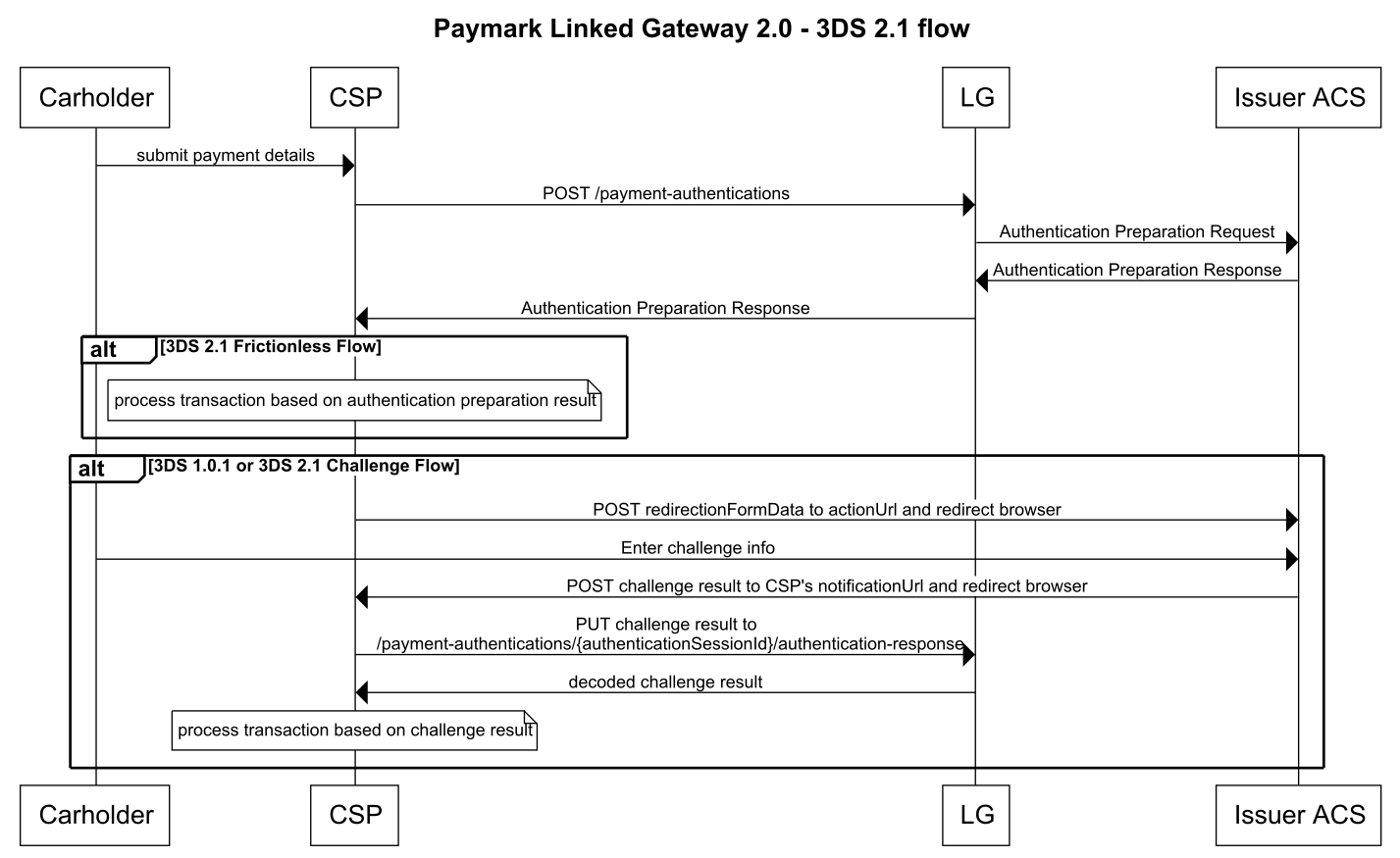
A 3DS2 authentication completes in one of two modes:
-
Frictionless — the issuer’s Access Control Server (ACS) determines the risk is low and authenticates without cardholder interaction. One request, one response, then proceed to the transaction.
-
Challenge — the ACS requires the cardholder to verify their identity (e.g. OTP, biometric). Requires an additional redirect and finalise step before the transaction can proceed.
In some cases a method URL response is received first, requiring a browser redirect before either flow continues.
Important: Store the
authenticationSessionIdfrom every response — it is required to complete a challenge, retrieve authentication details, and for debugging.
Step 1 — Authentication Preparation Request
Every authentication starts with an authentication preparation request. Send as much cardholder and transaction data as possible — more data increases the probability of a frictionless authentication. See 3DS2 Field Groups for guidance.
POST /transaction/payment-authentication HTTP/1.1

Authorization: Bearer dGVzdDp0ZXN0

Accept: application/vnd.paymark_api+json;version=2.0

Content-Type: application/vnd.paymark_api+json;version=2.0

{
    "card":{
        "cardNumber":"5123456789012346",
        "expiryDate":"2028-07"
    },
    "merchant":{
        "cardAcceptorIdCode":"854321",
        "transactionReference":"Test Reference",
        "transactionInformation":"Test Info",
        "timeStamp":"2025-04-14T11:55:04Z"
    },
    "transaction":{
        "amount":5649,
        "source":"Web Site",
        "dateTime":"2025-04-14T11:55:04Z"
    },
    "messageCategory":"PaymentAuthentication",
    "notificationUrl":"https://www.yoursite.com/3ds-notifications",
    "threeDsRequestorInformation":{
        "authenticationIndicator":"PaymentTransaction"
    },
    "email":"jane.smith@example.com",
    "accountInformation":{
        "cardholderInformation":{
            "name":"Jane Smith"
        }
    },
    "browser":{
        "accept":"text/html,application/xhtml+xml,application/xml;q=0.9,image/webp,*/*;q=0.8",
        "javaEnabled":true,
        "language":"en-NZ",
        "colorDepth":"32bits",
        "screenHeight":480,
        "screenWidth":640,
        "timeZone":-780,
        "userAgent":"Mozilla/5.0 (X11; Linux x86_64) AppleWebKit/537.36 (KHTML, like Gecko) Chrome/77.0.3865.90 Safari/537.36",
        "ipAddress":"2001:0db8:0000:0042:0000:8a2e:0370:7334"
    }
}
Frictionless Response — authenticationStatus is Y, A, U, or R (not C). Skip Steps 2 and 3 and proceed directly to Step 4 — Process the Transaction.
HTTP/1.1 200 OK

Content-Type: application/vnd.paymark_api+json;version=2.0

{
    "authenticationSessionId":"117952fa-b3d0-49f9-a6b8-c7713f3f162b",
    "protocolVersion":"2.2.0",
    "mpiTwo":{
        "threeDSServerTransactionId":"fb6bbbf6-403d-4ad5-b8cd-728a190e2270",
        "authenticationResponse":{
            "transactionId":"ZjI1MDg0ZjAtNWIxNi00YzBhLWFlNWQtYjI0ODA4YTk1ZTRi",
            "authenticationStatus":"Y",
            "authenticationReference":"4C644F6D-F665-4DA3-B8C2-ECC7FFAACFA8",
            "directoryServerTransactionId":"f25084f0-5b16-4c0a-ae5d-b24808a95e4b",
            "acsUrl":"https://test-acs.scheme.com",
            "eci":"05",
            "authenticationValue":"AAABBEg0VhI0VniQEjRWAAAAAAA="
        }
    }
}
Challenge Response — authenticationStatus is C. The ACS requires cardholder verification. Proceed to Step 2.
HTTP/1.1 200 OK

Content-Type: application/vnd.paymark_api+json;version=2.0

{
    "authenticationSessionId":"83c516d7-37a2-42d2-80b4-48d45570a27e",
    "protocolVersion":"2.2.0",
    "mpiTwo":{
        "threeDSServerTransactionId":"72d37196-5994-4158-ae35-8c1bfa2da342",
        "redirectionFormData":{
            "action":"https://test-acs.scheme.com",
            "values":{
                "creq":"eyJhY3NUcmFuc0lEIjoiRjdBOUNFNDMtQjdENi00ODk3LTk0QjQtMkFBNDMxQzlCOTVFIiwiY2hhbGxlbmdlV2luZG93U2l6ZSI6IjA1IiwibWVzc2FnZVR5cGUiOiJDUmVxIiwibWVzc2FnZVZlcnNpb24iOiIyLjIuMCIsInRocmVlRFNTZXJ2ZXJUcmFuc0lEIjoiNzJkMzcxOTYtNTk5NC00MTU4LWFlMzUtOGMxYmZhMmRhMzQyIn0",
                "threeDSSessionData":"YzI3NzNiZWMtNTcxNy00NTY0LTgxNmUtNzg5N2NmZDZkN2Yz"
            }
        },
        "authenticationResponse":{
            "authenticationStatus":"C",
            "authenticationReference":"F7A9CE43-B7D6-4897-94B4-2AA431C9B95E",
            "directoryServerTransactionId":"f25084f0-5b16-4c0a-ae5d-b24808a95e4b",
            "acsUrl":"https://test-acs.scheme.com"
        }
    }
}
Method URL Response — In some cases a method URL is received before the authentication response. See Step 3 — Method URL Variant.
Step 2 — Challenge Redirect (Challenge flow only)
Redirect the cardholder’s browser to redirectionFormData.action using a form POST containing all values in redirectionFormData.values:
POST https://test-acs.scheme.com

Content-Type: application/x-www-form-urlencoded

threeDSSessionData=YzI3NzNiZWMtNTcxNy00NTY0LTgxNmUtNzg5N2NmZDZkN2Yz&
creq=eyJhY3NUcmFuc0lEIjoiQzFBQjk5OTEtMTg0MS00Q0IwLUIyOTctNzdDNEU2OUI5MTExIiwiY2hhbGxlbmdlV2luZG93U2l6ZSI6IjA1IiwibWVzc2FnZVR5cGUiOiJDUmVxIiwibWVzc2FnZVZlcnNpb24iOiIyLjEuMCIsInRocmVlRFNTZXJ2ZXJUcmFuc0lEIjoiMTE5Y2E2NGEtMTRjOC00MDk1LWFlNmEtODc4ZGZlMTg5ZGE1In0=
When the cardholder completes the challenge, the ACS will POST the result to the notificationUrl you specified in Step 1:
threeDSSessionData=YzI3NzNiZWMtNTcxNy00NTY0LTgxNmUtNzg5N2NmZDZkN2Yz&
cres=eyJhY3NUcmFuc0lEIjoiQzFBQjk5OTEtMTg0MS00Q0IwLUIyOTctNzdDNEU2OUI5MTExIiwidHJhbnNTdGF0dXMiOiJOIiwibWVzc2FnZVR5cGUiOiJDUmVzIiwibWVzc2FnZVZlcnNpb24iOiIyLjEuMCIsInRocmVlRFNTZXJ2ZXJUcmFuc0lEIjoiMTE5Y2E2NGEtMTRjOC00MDk1LWFlNmEtODc4ZGZlMTg5ZGE1In0
Proceed to Step 2A — Finalise Authentication.
Step 2A — Finalise Authentication (Challenge flow only)
Send the cres value back to Linked Gateway for decoding, using the authenticationSessionId from Step 1:
PUT /transaction/payment-authentication/{authenticationSessionId}/authentication-response HTTP/1.1

Authorization: Bearer dGVzdDp0ZXN0

Accept: application/vnd.paymark_api+json;version=2.0

Content-Type: application/vnd.paymark_api+json;version=2.0

{
    "mpiTwoResponse":{
        "cres":"eyJhY3NUcmFuc0lEIjoiQzFBQjk5OTEtMTg0MS00Q0IwLUIyOTctNzdDNEU2OUI5MTExIiwidHJhbnNTdGF0dXMiOiJOIiwibWVzc2FnZVR5cGUiOiJDUmVzIiwibWVzc2FnZVZlcnNpb24iOiIyLjEuMCIsInRocmVlRFNTZXJ2ZXJUcmFuc0lEIjoiMTE5Y2E2NGEtMTRjOC00MDk1LWFlNmEtODc4ZGZlMTg5ZGE1In"
    }
}
Response:
HTTP/1.1 200 OK

Content-Type: application/vnd.paymark_api+json;version=2.0

{
    "authenticationStatus":"Y",
    "authenticationReference":"9D366C52-3CAC-4B0A-A7C7-60253B4BBA73",
    "authenticationValue":"AAABBEg0VhI0VniQEjRWAAAAAAA=",
    "authenticationMode":"Challenge",
    "transactionId":"NURGRjY5NTQtOTYwRi00MkUwLTlFMDMtRDM3RkJBNDU0MkE2",
    "eci":"05",
    "protocolVersion":"2.2.0",
    "directoryServerTransactionId":"5DFF6954-960F-42E0-9E03-D37FBA4542A6"
}
Proceed to Step 4 using eci, authenticationValue, transactionId, and protocolVersion from this response.
Step 3 — Method URL Variant
In some cases the Step 1 response includes a methodUrl. This is a browser fingerprinting step required by the ACS before authentication can proceed.
HTTP/1.1 200 OK

Content-Type: application/vnd.paymark_api+json;version=2.0

{
    "authenticationSessionId":"01ef534f-03ec-4471-9a43-b8cff9e5cf72",
    "protocolVersion":"2.2",
    "mpiTwo":{
        "threeDSServerTransactionId":"5f76db26-2c10-44e7-aa70-3cf2469739bd",
        "methodUrl":"https://test-acs.scheme.com/acs-simulation/method-url",
        "redirectionFormData":{
            "action":"https://test-acs.scheme.com",
            "values":{
                "methodUrl":"https://test-acs.scheme.com/acs-simulation/method-url",
                "threeDSMethodData":"eyJ0aHJlZURTU2VydmVyVHJhbnNJRCI6IjVmNzZkYjI2LTJjMTAtNDRlNy1hYTcwLTNjZjI0Njk3MzliZCIsInRocmVlRFNNZXRob2ROb3RpZmljYXRpb25VUkwiOiJodHRwczovL21ldGhvZHVybC5wcmVwcm9kLnBzcC1zb2x1dGlvbnMuY29tLzNkcy1tZXRob2QtcmVkaXJlY3Rpb24vMDFlZjUzNGYtMDNlYy00NDcxLTlhNDMtYjhjZmY5ZTVjZjcyL1Zpc2EvcmVxdWVzdC9jYWxsYmFjayJ9"
            }
        }
    }
}
Redirect the cardholder’s browser to redirectionFormData.action. When complete, the ACS will POST back to your notificationUrl — either a challenge response (with cres) or a frictionless response (with an empty cres).
3A — Challenge flow with method URL: Submit the cres to Linked Gateway as per Step 2A.
3B — Frictionless flow with method URL: Submit an empty cres:
PUT /transaction/payment-authentication/{authenticationSessionId}/authentication-response HTTP/1.1

Authorization: Bearer dGVzdDp0ZXN0

Accept: application/vnd.paymark_api+json;version=2.0

Content-Type: application/vnd.paymark_api+json;version=2.0

{
    "mpiTwoResponse":{
        "cres":""
    }
}
Step 4 — Process the Transaction
Once you have the authentication result, include the 3ds2 object in your transaction request using the values returned from authentication.
Payment
POST /transaction/v3/payment HTTP/1.1

Authorization: Bearer dGVzdDp0ZXN0

Accept: application/vnd.paymark_api+json;version=2.0

Content-Type: application/vnd.paymark_api+json;version=2.0

{
    "card":{
        "cardNumber":"5123456789012346",
        "expiryDate":"2028-07",
        "cardSecurityCodePresence":"Present",
        "cardSecurityCode":"111"
    },
    "merchant":{
        "cardAcceptorIdCode":"854321",
        "transactionReference":"Test Reference",
        "transactionInformation":"Test Info",
        "timeStamp":"2025-04-14T11:55:04Z"
    },
    "transaction":{
        "amount":5649,
        "source":"Web Site"
    },
    "3ds2":{
        "authenticationStatus":"Y",
        "eci":"05",
        "authenticationValue":"AAABBEg0VhI0VniQEjRWAAAAAAA=",
        "transactionId":"f5064c70-1556-472a-bde1-dd6b45d37be6",
        "protocolVersion":"2.2.0"
    }
}
Example Response:
HTTP/1.1 201 Created

Content-Type: application/vnd.paymark_api+json;version=2.0

{
  "links": [
    {
    "href":"https://apitest.paymark.nz/transaction/payment/ec2b8e9d-2b88-4460-9257-11d7a629b43b",
    "rel":"self"
    }
  ],
  "id":"ec2b8e9d-2b88-4460-9257-11d7a629b43b",
  "status":"complete",
  "creationTime":"2025-04-14T11:55:04.946Z",
  "modificationTime":"2025-04-14T11:55:04.946Z",
  "card":{
    "token":"4ff817be-e6ce-4b66-a797-1a3dce362b3a",
    "maskedNumber":"512345..2346",
    "expiryDate":"2028-07",
    "cardSecurityCodePresence":"Present",
    "cardSecurityCodeResponse":"Not Processed"
  },
  "merchant":{
    "cardAcceptorIdCode":"854321",
    "transactionReference":"Test Reference",
    "transactionInformation":"Test Info",
    "street":"123 The Avenue",
    "suburb":"Auckland Heights",
    "city":"Auckland",
    "postalCode":"1000",
    "country":"NZ",
    "cardAcceptorName":"Greatest BBQ On Earth",
    "acquiringInstitutionId":"503513",
    "mcc":"1234",
    "terminal":"98765432101",
    "timeStamp":"2025-04-14T11:55:04.946Z"
  },
  "3ds2":{
    "authenticationStatus":"Y",
    "eci":"05",
    "authenticationValue":"AAABBEg0VhI0VniQEjRWAAAAAAA=",
    "transactionId":"f5064c70-1556-472a-bde1-dd6b45d37be6",
    "protocolVersion":"2.2.0"
  },
  "transaction":{
    "amount":5649,
    "currency":"NZD",
    "source":"Web Site",
    "frequency":"single",
    "processorResponseCode":"00",
    "settlementDate":"2025-04-15",
    "authorisationCode":"123456",
    "retrievalReferenceNumber":"123456789012",
    "systemTraceAuditNumber":"061610",
    "gatewayRecommendation":"NO_ACTION",
    "gatewayCode":"APPROVED",
    "gatewayResult":"SUCCESS",
    "merchantAdviceCode":"00"
  }
}
Authorisation
Note: For Mastercard authorisations, the ECI value is 02 (not 05 as used for payments).
POST /transaction/v3/authorisation HTTP/1.1

Authorization: Bearer dGVzdDp0ZXN0

Accept: application/vnd.paymark_api+json;version=2.0

Content-Type: application/vnd.paymark_api+json;version=2.0

{
    "card":{
        "cardNumber":"5123456789012346",
        "expiryDate":"2028-07",
        "cardSecurityCodePresence":"Present",
        "cardSecurityCode":"111"
    },
    "merchant":{
        "cardAcceptorIdCode":"854321",
        "transactionReference":"Test Reference",
        "transactionInformation":"Test Info",
        "timeStamp":"2025-04-14T11:55:04Z"
    },
    "transaction":{
        "amount":5649,
        "source":"Web Site",
        "periodType":"calendar days",
        "periodDuration":1
    },
    "3ds2":{
        "authenticationStatus":"Y",
        "eci":"02",
        "authenticationValue":"AAABBEg0VhI0VniQEjRWAAAAAAA=",
        "transactionId":"f5064c70-1556-472a-bde1-dd6b45d37be6",
        "protocolVersion":"2.2.0"
    }
}
Example Response:
HTTP/1.1 201 Created

Content-Type: application/vnd.paymark_api+json;version=2.0

{
  "links": [
    {
    "href":"https://apitest.paymark.nz/transaction/authorisation/ec2b8e9d-2b88-4460-9257-11d7a629b43b",
    "rel":"self"
    }
  ],
  "id":"ec2b8e9d-2b88-4460-9257-11d7a629b43b",
  "status":"complete",
  "creationTime":"2025-04-14T11:55:04.946Z",
  "modificationTime":"2025-04-14T11:55:04.946Z",
  "card":{
    "token":"4ff817be-e6ce-4b66-a797-1a3dce362b3a",
    "maskedNumber":"512345..2346",
    "expiryDate":"2028-07",
    "cardSecurityCodePresence":"Present",
    "cardSecurityCodeResponse":"Not Processed"
  },
  "merchant":{
    // fields as per previous example
  },
  "3ds2":{
    "authenticationStatus":"Y",
    "eci":"02",
    "authenticationValue":"AAABBEg0VhI0VniQEjRWAAAAAAA=",
    "transactionId":"f5064c70-1556-472a-bde1-dd6b45d37be6",
    "protocolVersion":"2.2.0"
  },
  "transaction":{
    "amount":5649,
    "currency":"NZD",
    "source":"Web Site",
    "frequency":"single",
    "processorResponseCode":"00",
    "periodType":"calendar days",
    "periodDuration":1,
    "settlementDate":"2025-04-15",
    "authorisationCode":"123456",
    "retrievalReferenceNumber":"123456789012",
    "systemTraceAuditNumber":"061610",
    "gatewayRecommendation":"NO_ACTION",
    "gatewayCode":"APPROVED",
    "gatewayResult":"SUCCESS",
    "merchantAdviceCode":"00"
  }
}
Status Check
[NEEDS REVIEW]: No source example exists for a Status Check with a
3ds2object. The field structure below is inferred from the Payment and Authorisation examples. Please verify before publishing.
POST /transaction/v3/status HTTP/1.1

Authorization: Bearer dGVzdDp0ZXN0

Accept: application/vnd.paymark_api+json;version=2.0

Content-Type: application/vnd.paymark_api+json;version=2.0

{
    "card":{
        "cardNumber":"5123456789012346",
        "expiryDate":"2028-07",
        "cardHolderName":"Pam Ark",
        "cardSecurityCodePresence":"Present",
        "cardSecurityCode":"111"
    },
    "merchant":{
        "cardAcceptorIdCode":"854321",
        "transactionReference":"Test Reference",
        "transactionInformation":"Test Info",
        "timeStamp":"2025-04-14T11:55:04Z"
    },
    "transaction":{
        "source":"Web Site",
        "storedCredentials":"new"
    },
    "3ds2":{
        "authenticationStatus":"Y",
        "eci":"05",
        "authenticationValue":"AAABBEg0VhI0VniQEjRWAAAAAAA=",
        "transactionId":"f5064c70-1556-472a-bde1-dd6b45d37be6",
        "protocolVersion":"2.2.0"
    }
}
Authentication Results
| Status | Meaning | Liability | Action |
|---|---|---|---|
| Y | Successfully authenticated | Shifts to issuer | Proceed with transaction. |
| A | Authentication via Attempts Server | Shifts to issuer | Proceed with transaction. Authenticated by issuer’s attempt server rather than ACS. |
| N | Authentication failed | Remains with merchant | Paymark will reject any transaction request where authenticationStatus = N. |
| U | Authentication status unavailable | Remains with merchant | Technical error during authentication. Merchant may choose to continue but retains fraud liability. |
| R | Authentication rejected by issuer | n/a | Do not process. The issuer has rejected the authentication request. |
| C | Challenge required | - | Complete Steps 2–3 before processing. |
Visa ECI values:
| Scenario | Authentication Status | ECI | CAVV Present |
|---|---|---|---|
| Authentication success | Y | 05 | Yes |
| Authentication attempted | A | 06 | Optional |
| Authentication failure | N or U | 07 | No |
Mastercard ECI values:
| Scenario | Authentication Status | ECI | AVV Present |
|---|---|---|---|
| Authentication success | Y | 02 | Yes |
| Authentication attempted | A | 01 | Yes |
| Authentication failure | N | 00 | No |
| Unable to authenticate | U | - | No |
3DS2 Field Groups
Sending more cardholder data increases the probability of frictionless authentication. Fields are grouped by priority:
| Field group | Why | Fields |
|---|---|---|
| Required fields | Minimum required for 3DS2 authentication | 19 |
| Merchant Risk Info, Cardholder Account Info | Strongly recommended by EMVco | 26 |
| Transaction & Checkout Page Info | Lowest effort for merchants to source | 27 |
| Login & Authentication Info | More effort, higher frictionless impact | 7 |
Required Fields
Minimum viable authentication request. See the Step 1 example above for the full request structure.
| Field | Type | Constraints | Notes |
|---|---|---|---|
card.cardNumber |
String | Min 13, Max 19 chars | Required |
card.expiryDate |
String | Format: YYYY-MM | Required |
merchant.cardAcceptorIdCode |
String | Required | |
merchant.transactionReference |
String | Required | |
transaction.amount |
Integer | Required | |
transaction.source |
String | "Web Site", "MOTO", "Call Centre" |
Required |
transaction.dateTime |
String | ISO 8601 | Required |
messageCategory |
String enum | PaymentAuthentication, NonPaymentAuthentication, DataOnlyProcessForMastercard |
Required. Confirmed LG-6955 |
threeDsRequestorInformation.authenticationIndicator |
String enum | PaymentTransaction, RecurringTransaction, InstalmentTransaction, AddCard, MaintainCard, CardholderVerificationAsPartOfEmvTokenIdAndV, BillingAgreement, SplitShipment, DelayedShipment, SplitPayment |
Required. Confirmed LG-6955 |
notificationUrl |
String | Max 256 chars. Pattern: ^https?:\/\/.+$ |
Required |
browser.accept |
String | Max 2048 chars | Required |
browser.javaEnabled |
Boolean | Required | |
browser.language |
String | Max 8 chars. Must conform to IETF BCP47 e.g. "en-NZ". Confirmed LG-6955 |
Required |
browser.colorDepth |
String enum | 1bit, 4bits, 8bits, 15bits, 16bits, 24bits, 32bits, 48bits. Use "1bit" if JavaScript disabled. Confirmed LG-6955 |
Required |
browser.screenHeight |
Integer | Range 0–999999 | Required |
browser.screenWidth |
Integer | Range 0–999999 | Required |
browser.timeZone |
Integer | UTC offset in minutes. Use 0 if JavaScript disabled |
Required |
browser.userAgent |
String | Max 2048 chars | Required |
browser.ipAddress |
String | Max 250 chars. Pattern: ^([0-9A-Fa-f]{0,4}:){1,7}[0-9A-Fa-f]{1,4}\|(\d{1,3}\.){3}\d{1,3}$. Confirmed LG-6955 |
Required |
Merchant Risk Info, Cardholder Account Info
Strongly recommended by EMVco. These fields have the highest impact on achieving frictionless authentication.
"accountInformation":{
        "cardholderInformation":{
            "name":"Jane Smith",
            "accountAgeIndicator":"MoreThan60Days",
            "accountDate":"2022-02-03",
            "accountChangeIndicator":"MoreThan60Days",
            "accountChange":"2022-02-03",
            "accountPasswordChangeIndicator":"Between30And60Days",
            "accountPasswordChange":"2023-04-02"
        },
        "shippingAddressWasFirstUsed":"MoreThan60Days",
        "shippingAddressUsage":"2023-05-20",
        "transactionActivityInTheLast24Hours":0,
        "transactionActivityLastYear":52,
        "provisionAttemptsInTheLast24Hours":0,
        "numberOfPurchaseWithAccountInTheLastSixMonths":26,
        "suspiciousAccountActivityDetected":false,
        "shippingNameAndCardholderNameAreIdentical":true,
        "paymentAccountIndicator":"MoreThan60Days",
        "paymentAccountAge":"2022-12-04"
    },
    "merchantRiskIndicator":{
        "shippingIndicator":"ShipToCardholdersBillingAddress",
        "deliveryTimeframe":"OvernightShipping",
        "deliveryEmailAddress":"test@example.org",
        "reorderItemsIndicator":"FirstTime",
        "preOrderPurchaseIndicator":"MerchandiseAvailable",
        "preOrderDate":"2025-05-27",
        "giftCardInformation":{
            "amount":{
                "currency":"NZD",
                "amount":10000
            },
            "count":1
        }
}| Field | Type | Constraints | Notes |
|---|---|---|---|
accountInformation.cardholderInformation.name |
String | Max 45 chars | Optional. Cardholder name as on card. Confirmed LG-5219 |
accountInformation.cardholderInformation.accountAgeIndicator |
String enum | NoAccount, CreatedDuringTransaction, LessThan30Days, Between30And60Days, MoreThan60Days |
Optional |
accountInformation.cardholderInformation.accountDate |
String | Format: YYYY-MM-DD | Optional. Date cardholder created account with merchant |
accountInformation.cardholderInformation.accountChangeIndicator |
String enum | ChangedDuringThisTransaction, LessThan30Days, Between30And60Days, MoreThan60Days |
Optional |
accountInformation.cardholderInformation.accountChange |
String | Format: YYYY-MM-DD | Optional |
accountInformation.cardholderInformation.accountPasswordChangeIndicator |
String enum | ChangedDuringThisTransaction, LessThan30Days, Between30And60Days, MoreThan60Days |
Optional |
accountInformation.cardholderInformation.accountPasswordChange |
String | Format: YYYY-MM-DD | Optional |
accountInformation.shippingAddressWasFirstUsed |
String enum | ThisTransaction, LessThan30Days, Between30And60Days, MoreThan60Days |
Optional |
accountInformation.shippingAddressUsage |
String | Format: YYYY-MM-DD | Optional |
accountInformation.transactionActivityInTheLast24Hours |
Integer | Range 0–999 | Optional |
accountInformation.transactionActivityLastYear |
Integer | Range 0–999 | Optional |
accountInformation.provisionAttemptsInTheLast24Hours |
Integer | Range 0–999 | Optional |
accountInformation.numberOfPurchaseWithAccountInTheLastSixMonths |
Integer | Range 0–999 | Optional |
accountInformation.suspiciousAccountActivityDetected |
Boolean | Optional | |
accountInformation.shippingNameAndCardholderNameAreIdentical |
Boolean | Optional | |
accountInformation.paymentAccountIndicator |
String enum | NoAccount, DuringThisTransaction, LessThan30Days, Between30And60Days, MoreThan60Days |
Optional |
accountInformation.paymentAccountAge |
String | Format: YYYY-MM-DD | Optional |
merchantRiskIndicator.shippingIndicator |
String enum | ShipToCardholdersBillingAddress, ShipToAnotherVerifiedAddressOnFileWithMerchant, ShipToAddressThatIsDifferentThanTheCardholdersBillingAddress, PickUpAtLocalStore, DigitalGoods, TravelAndEventTicketsNotShipped |
Optional |
merchantRiskIndicator.deliveryTimeframe |
String enum | ElectronicDelivery, SameDayShipping, OvernightShipping, TwoDayOrMoreShipping |
Optional |
merchantRiskIndicator.deliveryEmailAddress |
String | Max 254 chars. Pattern: ^.*@.*\..*$ |
Optional. For electronic delivery |
merchantRiskIndicator.reorderItemsIndicator |
String enum | FirstTime, Reordered |
Optional |
merchantRiskIndicator.preOrderPurchaseIndicator |
String enum | MerchandiseAvailable, FutureAvailablility |
Optional |
merchantRiskIndicator.preOrderDate |
String | Format: YYYY-MM-DD | Optional |
merchantRiskIndicator.giftCardInformation.amount.amount |
Integer | Conditional. Required if giftCardInformation.amount.currency provided |
|
merchantRiskIndicator.giftCardInformation.amount.currency |
String enum | ISO 4217: AUD, CAD, CHF, CNY, DKK, EUR, GBP, HKD, JPY, KRW, MYR, NOK, NZD, SEK, SGD, USD, ZAR |
Conditional. Required if giftCardInformation.amount.amount provided |
merchantRiskIndicator.giftCardInformation.count |
Integer | Range 1–99 | Optional |
Transaction & Checkout Page Info
Describes the transaction and information typically entered by the cardholder during checkout.
"billingAddressSameAsShippingAddress":true,
    "billingAddress":{
        "addressLine1":"Apartment 1A",
        "addressLine2":"162 Victoria Street",
        "postalCode":"1019",
        "city":"Auckland",
        "state":"AUK",
        "country":"NZ"
    },
    "email":"fred.dagg@gmail.com",
    "shippingAddress":{
        "addressLine1":"Apartment 1A",
        "addressLine2":"162 Victoria Street",
        "postalCode":"1019",
        "city":"Auckland",
        "state":"AUK",
        "country":"NZ"
    },
    "transactionType":"GoodsOrServicePurchase",
    "accountType":"Credit",
    "homePhone":{"country":"64","subscriber":"93568088"},
    "mobilePhone":{"country":"64","subscriber":"210987654"},
"workPhone":{"country":"64","subscriber":"93568088"}| Field | Type | Constraints | Notes |
|---|---|---|---|
billingAddressSameAsShippingAddress |
Boolean | Optional | |
billingAddress.addressLine1 |
String | Max 50 chars | Optional |
billingAddress.addressLine2 |
String | Max 50 chars | Optional |
billingAddress.addressLine3 |
String | Max 50 chars | Optional |
billingAddress.postalCode |
String | Optional | |
billingAddress.city |
String | Max 50 chars | Optional |
billingAddress.state |
String | ISO 3166-2 subdivision code e.g. "AUK" |
Optional |
billingAddress.country |
String | Max 2 chars. ISO 3166-1 alpha-2 e.g. "NZ" |
Optional |
email |
String | Max 254 chars. Pattern: ^.*@.*\..*$ |
Optional. Cardholder’s email address |
shippingAddress.addressLine1 |
String | Max 50 chars | Optional |
shippingAddress.addressLine2 |
String | Max 50 chars | Optional |
shippingAddress.addressLine3 |
String | Max 50 chars | Optional |
shippingAddress.postalCode |
String | Optional | |
shippingAddress.city |
String | Max 50 chars | Optional |
shippingAddress.state |
String | ISO 3166-2 subdivision code e.g. "AUK" |
Optional |
shippingAddress.country |
String | Max 2 chars. ISO 3166-1 alpha-2 e.g. "NZ" |
Optional |
transactionType |
String enum | GoodsOrServicePurchase, CheckAcceptance, AccountFunding, QuasiCashTransaction, PrepaidActivationAndLoad |
Optional. Confirmed LG-6955 |
accountType |
String enum | NotApplicable, Credit, Debit |
Optional |
homePhone.country |
String | Min 1, Max 3 chars. Digits only. Pattern: ^[0-9]{1,3}$. e.g. "64" |
Conditional. Required if homePhone.subscriber provided. Confirmed LG-6955 |
homePhone.subscriber |
String | Max 15 chars | Conditional. Required if homePhone.country provided |
mobilePhone.country |
String | Min 1, Max 3 chars. Digits only. Pattern: ^[0-9]{1,3}$. e.g. "64" |
Conditional. Required if mobilePhone.subscriber provided. Confirmed LG-6955 |
mobilePhone.subscriber |
String | Max 15 chars | Conditional. Required if mobilePhone.country provided |
workPhone.country |
String | Min 1, Max 3 chars. Digits only. Pattern: ^[0-9]{1,3}$. e.g. "64" |
Conditional. Required if workPhone.subscriber provided. Confirmed LG-6955 |
workPhone.subscriber |
String | Max 15 chars | Conditional. Required if workPhone.country provided |
Login & Authentication Info
Describes how the cardholder logged into the merchant website and their history of 3DS authentication.
"threeDsRequestorInformation":{
        "authenticationInformation":{
            "method":"LoginToTheCardholderAccountAtThe3DSRequestorSystemUsingFederatedId",
            "timestamp":"2025-01-13T20:51:55.213Z"
        },
        "challengeIndicator":"NoPreference",
        "priorAuthenticationInfo":{
            "method":"FrictionlessAuthenticationOccurredByAcs",
            "reference":"d91afd45-f9b4-4746-a239-4b148b2f4671",
            "timestamp":"2025-01-13T20:51:55.213Z"
        },
        "authenticationIndicator":"PaymentTransaction",
        "recurringExpiry":"2025-05-27",
        "recurringFrequency":14
}| Field | Type | Constraints | Notes |
|---|---|---|---|
threeDsRequestorInformation.challengeIndicator |
String enum | NoPreference, NoChallengeRequested, ChallengeRequested3DSRequestorPreference, ChallengeRequestedMandate |
Optional. Allows merchant to indicate preference for challenge |
threeDsRequestorInformation.authenticationInformation.method |
String enum | No3DSRequestorAuthenticationOccurred, LoginToTheCardholderAccountAtThe3DSRequestorSystemUsingFederatedId, LoginToTheCardholderAccountAtThe3DSRequestorSystemUsingThirdPartyAuthentication, LoginToTheCardholderAccountAtThe3DSRequestorSystemUsingFidoAuthenticator |
Optional |
threeDsRequestorInformation.authenticationInformation.timestamp |
String | ISO 8601 UTC | Optional. Date and time of cardholder authentication |
threeDsRequestorInformation.priorAuthenticationInfo.method |
String enum | FrictionlessAuthenticationOccurredByAcs, CardholderChallengeOccurredByAcs, AvsVerified, OtherIssuerMethods |
Optional |
threeDsRequestorInformation.priorAuthenticationInfo.reference |
String | UUID format | Optional. Reference to previous authentication |
threeDsRequestorInformation.priorAuthenticationInfo.timestamp |
String | ISO 8601 UTC | Optional |
threeDsRequestorInformation.recurringExpiry |
String | Format: YYYY-MM-DD | Optional. Date of final recurring payment if initiating a recurring agreement |
threeDsRequestorInformation.recurringFrequency |
Integer | Max 9999 | Optional. Minimum days between authorisations |
Test Cards
For 3DS2 test cards covering frictionless, challenge, and method URL flows, see the Test Card Details section.
Card on File and MIT 
Overview
If you collect payment details from cardholders, store them, and use them to process future payments, these transactions must be correctly identified to comply with card scheme mandates for Credential on File (COF). Including the correct indicators provides:
-
better understanding of risk levels for issuers
-
higher authorisation approval rates and completed sales
-
improved customer experience
COF applies across the following transaction types:
| Pattern | Payment | Authorisation | Status Check |
|---|---|---|---|
| CIT — initial (storing card) | ✅ | ✅ | ✅ |
| CIT — subsequent (using stored) | ✅ | ✅ | ✅ |
| MIT — agreement setup | ✅ | ❌ | ✅ (zero-amount) |
| MIT — subsequent charge | ✅ | ❌ | ❌ |
All COF and MIT transactions must use the v3 endpoint.
Cardholder-Initiated Transactions (CIT)
A cardholder-initiated transaction is performed with the active participation of the cardholder — for example, an eCommerce checkout or MOTO transaction. Set transaction.source to "Web Site" or "MOTO" to indicate cardholder initiation.
Initial CIT — Storing Card Details
Use when the cardholder agrees to store their card details for future use, as part of registration or account creation.
| Field | Value |
|---|---|
| transaction.source | “Web Site” or “MOTO” |
| transaction.storedCredentials | “new” |
Example — Payment:
POST /transaction/v3/payment HTTP/1.1

Authorization: Bearer dGVzdDp0ZXN0

Accept: application/vnd.paymark_api+json;version=2.0

Content-Type: application/vnd.paymark_api+json;version=2.0

{
    "card":{
        "cardNumber":"5123456789012346",
        "expiryDate":"2028-07",
        "cardSecurityCodePresence":"Present",
        "cardSecurityCode":"111"
    },
    "merchant":{
        "cardAcceptorIdCode":"854321",
        "transactionReference":"Test Reference",
        "transactionInformation":"Test Info",
        "timeStamp":"2025-04-14T11:55:04Z"
    },
    "transaction":{
        "amount":5649,
        "source":"Web Site",
        "storedCredentials":"new",
        "frequency":"single"
    }
}
Example Response:
HTTP/1.1 201 Created

Content-Type: application/vnd.paymark_api+json;version=2.0

{
  "links": [
    {
    "href":"https://apitest.paymark.nz/transaction/payment/ec2b8e9d-2b88-4460-9257-11d7a629b43b",
    "rel":"self"
    }
  ],
  "id":"ec2b8e9d-2b88-4460-9257-11d7a629b43b",
  "status":"complete",
  "creationTime":"2025-04-14T11:55:04.946Z",
  "modificationTime":"2025-04-14T11:55:04.946Z",
  "card":{
    "token":"4ff817be-e6ce-4b66-a797-1a3dce362b3a",
    "maskedNumber":"512345..2346",
    "expiryDate":"2028-07",
    "cardSecurityCodePresence":"Present",
    "cardSecurityCodeResponse":"Not Processed"
  },
  "merchant":{
    "cardAcceptorIdCode":"854321",
    "transactionReference":"Test Reference",
    "transactionInformation":"Test Info",
    "street":"123 The Avenue",
    "suburb":"Auckland Heights",
    "city":"Auckland",
    "postalCode":"1000",
    "country":"NZ",
    "cardAcceptorName":"Greatest BBQ On Earth",
    "acquiringInstitutionId":"503513",
    "mcc":"1234",
    "terminal":"98765432101",
    "timeStamp":"2025-04-14T11:55:04.946Z"
  },
  "transaction":{
    "amount":5649,
    "currency":"NZD",
    "source":"Web Site",
    "frequency":"single",
    "processorResponseCode":"00",
    "settlementDate":"2025-04-15",
    "authorisationCode":"123456",
    "retrievalReferenceNumber":"123456789012",
    "systemTraceAuditNumber":"061610",
    "storedCredentials":"new",
    "gatewayRecommendation":"NO_ACTION",
    "gatewayCode":"APPROVED",
    "gatewayResult":"SUCCESS",
    "merchantAdviceCode":"00"
  }
}
Example — Authorisation:
POST /transaction/v3/authorisation HTTP/1.1

Authorization: Bearer dGVzdDp0ZXN0

Accept: application/vnd.paymark_api+json;version=2.0

Content-Type: application/vnd.paymark_api+json;version=2.0

{
    "card":{
        "cardNumber":"5123456789012346",
        "expiryDate":"2028-07",
        "cardSecurityCodePresence":"Present",
        "cardSecurityCode":"111"
    },
    "merchant":{
        "cardAcceptorIdCode":"854321",
        "transactionReference":"Test Reference",
        "transactionInformation":"Test Info",
        "timeStamp":"2025-04-14T11:55:04Z"
    },
    "transaction":{
        "amount":5649,
        "source":"Web Site",
        "storedCredentials":"new",
        "frequency":"single",
        "periodType":"calendar days",
        "periodDuration":1
    }
}
Example — Status Check:
POST /transaction/v3/status HTTP/1.1

Authorization: Bearer dGVzdDp0ZXN0

Accept: application/vnd.paymark_api+json;version=2.0

Content-Type: application/vnd.paymark_api+json;version=2.0

{
    "card":{
        "cardNumber":"5123456789012346",
        "expiryDate":"2028-07",
        "cardHolderName":"Pam Ark",
        "cardSecurityCodePresence":"Present",
        "cardSecurityCode":"111"
    },
    "merchant":{
        "cardAcceptorIdCode":"854321",
        "transactionReference":"Test Reference",
        "transactionInformation":"Test Info",
        "timeStamp":"2025-04-14T11:55:04Z"
    },
    "transaction":{
        "source":"Web Site",
        "storedCredentials":"new"
    }
}
Subsequent CIT — Using Stored Card
Use when the cardholder returns and initiates a payment using their previously stored card.
| Field | Value |
|---|---|
| transaction.source | “Web Site” or “MOTO” |
| transaction.storedCredentials | “stored” |
Example — Payment:
POST /transaction/v3/payment HTTP/1.1

Authorization: Bearer dGVzdDp0ZXN0

Accept: application/vnd.paymark_api+json;version=2.0

Content-Type: application/vnd.paymark_api+json;version=2.0

{
    "card":{
        "cardNumber":"5123456789012346",
        "expiryDate":"2028-07",
        "cardSecurityCodePresence":"Not Present"
    },
    "merchant":{
        "cardAcceptorIdCode":"854321",
        "transactionReference":"Test Reference",
        "transactionInformation":"Test Info",
        "timeStamp":"2025-04-14T11:55:04Z"
    },
    "transaction":{
        "amount":5649,
        "source":"Web Site",
        "storedCredentials":"stored",
        "frequency":"single"
    }
}
Merchant-Initiated Transactions (MIT)
A merchant-initiated transaction is performed using stored payment details without the active participation of the cardholder. MIT applies to Payment only.
Common use cases:
-
Recurring — charges on a predefined schedule, e.g. subscription, gym membership
-
Unscheduled — charges on demand, e.g. account top-up when balance falls below a threshold
The cardholder must have agreed for their details to be stored for this purpose. Agreement information must be sent with every MIT transaction.
transaction.amountVariability is required when transaction.frequency is "Recurring":
-
FIXED — all payments in the agreement use the same amount (e.g. subscriptions, memberships)
-
VARIABLE — the amount differs between payments (e.g. electricity bills, phone bills)
transaction.agreementId is a string of up to 100 characters. If the merchant does not have a unique identifier, one should be generated and stored. An existing order ID, subscription ID, or account ID may also be used.
Establishing an Agreement — via Payment
Use when the merchant intends to charge the cardholder at the point of agreement creation.
Initial transaction fields:
| Field | Value |
|---|---|
| transaction.source | “Web Site” or “MOTO” |
| transaction.storedCredentials | “new” |
| transaction.frequency | “Recurring” or “Unscheduled” |
| transaction.agreementId | a unique identifier for the agreement e.g. UUID |
| transaction.amountVariability | “FIXED” or “VARIABLE” |
Example Request:
POST /transaction/v3/payment HTTP/1.1

Authorization: Bearer dGVzdDp0ZXN0

Accept: application/vnd.paymark_api+json;version=2.0

Content-Type: application/vnd.paymark_api+json;version=2.0

{
    "card":{
        "cardNumber":"5123456789012346",
        "expiryDate":"2028-07",
        "cardSecurityCodePresence":"Present",
        "cardSecurityCode":"111"
    },
    "merchant":{
        "cardAcceptorIdCode":"854321",
        "transactionReference":"Test Reference",
        "transactionInformation":"Test Info",
        "timeStamp":"2025-04-14T11:55:04Z"
    },
    "transaction":{
        "amount":5649,
        "source":"Web Site",
        "storedCredentials":"new",
        "frequency":"Recurring",
        "agreementId":"5b29c055-6e8b-4213-a320-834490f747d8",
        "amountVariability":"FIXED"
    }
}
Example Response:
HTTP/1.1 201 Created

Content-Type: application/vnd.paymark_api+json;version=2.0

{
  "links": [
    {
    "href":"https://apitest.paymark.nz/transaction/payment/ec2b8e9d-2b88-4460-9257-11d7a629b43b",
    "rel":"self"
    }
  ],
  "id":"ec2b8e9d-2b88-4460-9257-11d7a629b43b",
  "status":"complete",
  "creationTime":"2025-04-14T11:55:04.946Z",
  "modificationTime":"2025-04-14T11:55:04.946Z",
  "card":{
    "token":"4ff817be-e6ce-4b66-a797-1a3dce362b3a",
    "maskedNumber":"512345..2346",
    "expiryDate":"2028-07",
    "cardSecurityCodePresence":"Present",
    "cardSecurityCodeResponse":"Not Processed"
  },
  "merchant":{
    // fields as per previous example
  },
  "transaction":{
    "amount":5649,
    "currency":"NZD",
    "source":"Web Site",
    "frequency":"Recurring",
    "processorResponseCode":"00",
    "settlementDate":"2025-04-15",
    "authorisationCode":"123456",
    "retrievalReferenceNumber":"123456789012",
    "systemTraceAuditNumber":"061610",
    "storedCredentials":"new",
    "agreementId":"5b29c055-6e8b-4213-a320-834490f747d8",
    "amountVariability":"FIXED",
    "gatewayRecommendation":"NO_ACTION",
    "gatewayCode":"APPROVED",
    "gatewayResult":"SUCCESS",
    "merchantAdviceCode":"00"
  }
}
Establishing an Agreement — via Status Check (Zero-Amount)
Use when the merchant does not intend to charge the cardholder at the point of agreement creation — for example, a subscription where the first charge falls on a future date. A zero-amount status check becomes the first transaction in the agreement.
POST /transaction/v3/status HTTP/1.1

Authorization: Bearer dGVzdDp0ZXN0

Accept: application/vnd.paymark_api+json;version=2.0

Content-Type: application/vnd.paymark_api+json;version=2.0

{
    "card":{
        "cardNumber":"5123456789012346",
        "expiryDate":"2028-07",
        "cardHolderName":"Pam Ark",
        "cardSecurityCodePresence":"Present",
        "cardSecurityCode":"111"
    },
    "merchant":{
        "cardAcceptorIdCode":"854321",
        "transactionReference":"Test Reference",
        "transactionInformation":"Test Info",
        "timeStamp":"2025-04-14T11:55:04Z"
    },
    "transaction":{
        "amount":0,
        "source":"Web Site",
        "storedCredentials":"new",
        "frequency":"Recurring",
        "agreementId":"5b29c055-6e8b-4213-a320-834490f747d8",
        "amountVariability":"FIXED"
    }
}
Subsequent MIT — Merchant-Initiated Charge
Use for all subsequent charges under an established agreement, initiated by the merchant without cardholder participation.
Subsequent MIT fields:
| Field | Value |
|---|---|
| transaction.source | “Merchant” |
| transaction.storedCredentials | “stored” |
| transaction.frequency | “Recurring” or “Unscheduled” |
| transaction.agreementId | matching the agreementId from the initial request |
| transaction.amountVariability | “FIXED” or “VARIABLE” |
Example Request:
POST /transaction/v3/payment HTTP/1.1

Authorization: Bearer dGVzdDp0ZXN0

Accept: application/vnd.paymark_api+json;version=2.0

Content-Type: application/vnd.paymark_api+json;version=2.0

{
    "card":{
        "cardNumber":"5123456789012346",
        "expiryDate":"2028-07",
        "cardSecurityCodePresence":"Not Present"
    },
    "merchant":{
        "cardAcceptorIdCode":"854321",
        "transactionReference":"Test Reference",
        "transactionInformation":"Test Info",
        "timeStamp":"2025-04-14T11:55:04Z"
    },
    "transaction":{
        "amount":5649,
        "source":"Merchant",
        "storedCredentials":"stored",
        "frequency":"Recurring",
        "agreementId":"5b29c055-6e8b-4213-a320-834490f747d8",
        "amountVariability":"FIXED"
    }
}
Updating Card Details Under an Agreement
Card details used under an agreement may change in some circumstances, for example:
-
the cardholder lost their card and was issued a new one
-
the cardholder changed bank
-
the card had insufficient funds and the cardholder provided alternative details
If card details have changed (except in the case of card reissue or scheme token automatic update), the merchant must perform a cardholder-initiated transaction using the same agreementId to update the stored details before processing further MIT transactions with the new card number.
Depending on the merchant’s business model, they may choose to create a new agreement instead.
Required Fields Summary
| Field | Payment CIT | Payment MIT | Authorisation CIT | Status Check CIT | Status Check MIT setup |
|---|---|---|---|---|---|
| transaction.source | ✅ | ✅ (“Merchant”) | ✅ | ✅ | ✅ |
| transaction.storedCredentials | ✅ | ✅ | ✅ | ✅ | ✅ |
| transaction.frequency | Optional | ✅ | Optional | Optional | ✅ |
| transaction.agreementId | ❌ | ✅ | ❌ | ❌ | ✅ |
| transaction.amountVariability | ❌ | ✅ (Recurring) | ❌ | ❌ | ✅ (Recurring) |
Field Glossary 
General Fields
| Field Name | Type | Format or Example | Description |
|---|---|---|---|
| id | string | “XXXXXXXX-XXXX-XXXX-XXXX-XXXXXXXXXXXX” | Paymark-generated globally unique identifier for the resource. |
| status | string | " [ ‘created’ | ‘processing’ | ‘complete’ | ‘failed’ ] " | Status of the resource. One of: * created - resource has been created but processing has not been started. * processing - processing of the resource is currently in progress. * complete - processing of the resource has been completed. This does not imply an approval or decline, only that processing has completed. See also transaction.processorResponseCode. * failed - processing of the transaction has failed due to a technical fault. |
| creationTime | date/time as ISO 8601 string | “YYYY-MM-DDThh:mm:ss.000Z” | Date/time at which the resource was created. |
| modificationTime | date/time as ISO 8601 string | “YYYY-MM-DDThh:mm:ss.000Z” | Date/time at which the resource was last updated. |
| authorisationId | string | “XXXXXXXX-XXXX-XXXX-XXXX-XXXXXXXXXXXX” | Identifier of a previous authorisation resource which relates to this (capture or cancellation) transaction. |
| paymentId | string | “XXXXXXXX-XXXX-XXXX-XXXX-XXXXXXXXXXXX” | Identifier of a previous payment resource which relates to this (refund) transaction. |
card Object
| Field Name | Type | Format or Example | Description |
|---|---|---|---|
| cardNumber | string, length minimum 13, maximum 19 | 4111111111111111 | Card number / PAN to be used for payment. Card numbers must be ephemeral only and never stored. If provided, the Card number will be tokenised and the token returned in lieu of the Card number. |
| expiryDate | string | “YYYY-MM” | The month/year when the Card expires. |
| cardSecurityCodePresence | enumeration as string | " [ ‘Not Present’ | ‘Present’ | ‘Not Legible’ | ‘Not Imprinted’ ] " | An indication of the presence of the card security code (CSC / CVV). One of: * Not Present - No CSC was provided. * Present - CSC was provided. * Not Legible - No CSC was provided because it was not legible on the card. * Not Imprinted - No CSC was provided because it was not imprinted on the card. |
| cardSecurityCode | string, length minimum 3, maximum 4 | “1234” | The card security code (CSC / CVV) that is printed on the back of the Card. |
| cardSecurityCodeResponse | enumeration as string | " [ ‘Match’ | ‘No Match’ | ‘Not Processed’ | ‘Not on Card’ | ‘No Keys, not certified or both’ ] " | The result of looking up the Card’s CSC. One of: * Match - The CSC was checked and was correct. * No Match - The CSC was checked and was incorrect. * Not Processed - The CSC was not checked. * Not on Card. * No Keys, not certified or both. |
| cryptogram | enumeration as string | AwAAAAAAPboI4MoAmZZRghEAAAA= | Helps authenticate and protect the integrity of electronic transactions |
| type | enumeration as string | " [ ‘SCHEME_TOKEN’ | ‘CARD’ ] " | Identifies the transaction request is for CARD or SCHEME_TOKEN |
| eci | enumeration as string | " [ ‘00’ | ‘01’ | ‘02’ | ‘05’ | ‘06’ | ‘07’ ] " | Electronic commerce indicator received during the Scheme Tokenisation process. |
merchant Object
| Field Name | Type | Format or Example | Description |
|---|---|---|---|
| cardAcceptorIdCode | string, length minimum 1, maximum 15 | “850525” | Paymark-issued identifier for the Merchant. Also known as the MID or Merchant ID. |
| terminal | string | “85052501” | Paymark-issued terminal identifier for the Merchant. |
| transactionReference | string, length minimum 1, maximum 40 | “My unique reference” | Optional Merchant supplied transaction reference. Accepted special characters: _ @ . , ! # & $ " ’ ( ) - \ / : { } |
| transactionInformation | string, length minimum 1, maximum 40 | “My supporting information” | Optional Merchant supplied transaction information. Accepted special characters: _ @ . , ! # & $ " ’ ( ) - \ / : { } |
| timeStamp | string | “YYYY-MM-DDThh:mm:ss.000Z” | UTC date/time at the transaction source according to the Merchant, as ISO 8601 string. Linked Gateway 2.0 currently overwrites this field with UTC upon receipt. |
| acquiringInstitutionId | string | “500051” | Acquiring institution ID of the Bank to which the Merchant belongs. |
| cardAcceptorName | string | “Saisais Sushi” | Merchant’s trading name as provided by the Bank. |
| street | string | “5 The Parade” | Merchant’s street address as provided by the Bank. |
| suburb | string | “Christchurch Valley” | Merchant’s address suburb as provided by the Bank. |
| city | string | “Christchurch” | Merchant’s address city as provided by the Bank. |
| country | string | “New Zealand” | Merchant’s address country as provided by the Bank. |
| postalCode | string | “8000” | Merchant’s address post code as provided by the Bank. |
| mcc | string | “1234” | Classification code as provided by the Bank. |
transaction Object
| Field Name | Type | Format or Example | Description |
|---|---|---|---|
| systemTraceAuditNumber | string | “123456789” | Once the transaction status is complete, the Paymark-assigned transaction identifier. |
| amount | integer, length minimum 2, maximum 9 | 12345 | The amount of the transaction represented as the smallest unit of the currency. For NZD this will be a whole number of cents. For example, $12.50 is represented as 1250. For JPY, there are no cents, so ¥1250 is represented as 1250. Notes: * This field must be omitted for a status check and cancellation. * Refer to ISO 4217 for more information on currency units. |
| additionalAmount. originalAmount | integer, length minimum 2, maximum 9 | 12345 | The requested amount of the transaction represented as the smallest unit of the currency. For NZD this will be a whole number of cents. For example, $12.50 is represented as 1250. For JPY, there are no cents, so ¥1250 is represented as 1250. This is present when an authorisation has been approved for a lesser amount than that requested. The approved amount is shown in the amount field. |
| currency | string, ISO 4217 currency code | " [ ‘AUD’ | ‘NZD’ | ‘USD’ | … ] " | Optional. The currency of the amount, for example NZD. If the currency is not specified, the Merchant’s default will be used. Currencies currently supported by our banks include: ‘AUD’, ‘CAD’, ‘CHF’, ‘CNY’, ‘DKK’, ‘EUR’, ‘GBP’, ‘HKD’, ‘JPY’, ‘KRW’, ‘MYR’, ‘NOK’, ‘NZD’, ‘SEK’, ‘SGD’, ‘USD’, ‘ZAR’. Other currencies will return an error. |
| source | enumeration as string | " [ ‘Web Site’ | ‘Call Centre’ | ‘Merchant’ ] " | Optional. The source of the transaction. Captures who/what system handled the card data. If the source is not specified, the Merchant’s default will be used. Currently the API supports: * Web Site - online eCommerce transaction. * Call Centre - details were manually entered by the Merchant. * Merchant - for Merchant Initiated transactions. |
| processorResponseCode | string | “0A” | The result of processing the transaction. This can be used to determine whether the transaction was approved or declined. Available once the transaction status is “complete”. Note: For an authorisation request, the processorResponseCode = 10 indicates a partial authorisation, that is, less funds have been approved than were requested. The approved amount is shown in the amount field and the requested amount is shown in the additionalAmount.originalAmount field. Take care to ensure the maximum capture limit is adhered to i.e. “amount”. |
| periodType | enumeration as string | " [ ‘minutes’ | ‘hours’ | \’calendar days\’ ] " | For an authorisation, an indicator of what type of duration has been passed in the periodDuration field. One of: * minutes * hours * calendar days Note: This field must be omitted for a status check. |
| periodDuration | integer, range 1 to 99 | “7” | For an authorisation, the amount of time for which the authorised funds should be held. The periodType field indicates whether this value represents minutes, hours or calendar days. Note: This field must be omitted for a status check. |
| frequency | enumeration as string | " [ ‘single’ | ‘\recurring’ | ‘instalment’ ] " | Indicates whether this is a single, recurring, or instalment transaction. If the frequency is not specified, the Merchant’s default will be used. An indication of whether this is a one-off or repeat transaction. One of: * single – one-off transaction, or Customer initiated payment on a saved card. * recurring - an agreement between a Cardholder and a Merchant to bill the Cardholder’s account on a periodic basis without a specified end date e.g. bill payment or subscription. * instalment - an agreement between a Cardholder and a Mrchant to bill the Cardholder’s account where the number of payments is limited e.g. a purchase split over multiple payments. Note: Expiry Date must be sent with the first recurring transaction processed for a particular Card. Thereafter expiry date is optional. However, some Issuers may decline transactions if the expiry date is not present. |
| settlementDate | string | “YYYY-MM-DD” | An identification of which batch of transactions this transaction belongs to. Represents the date on which the funds were/will be transferred. The default settlement cut off time for Linked Gateway 2.0 clients is 2159, that is, any transactions done up to 21:59:59 will be included in “today’s” settlement. Any transactions after this time will be included in “tomorrow’s” settlement. If not specified in the request, this information is available once the transaction status is “complete”. If a future settlement date is required, this can be specified in a payment, refund, authorisation or capture request. In the event a settlement day of “today” is specified from 2200 onwards, Linked Gateway 2.0 will update this to “tomorrow” in the response. If using the settlement date field in the request, the client should pay attention to the settlement date received in the response. This field is not searchable, but is returned in the GET or query response (using other search criteria). This field is not permitted in a status check or cancellation request; however it is provided in the response. |
| authorisationCode | string, length minimum 0, maximum 6 | “6” | An identification of the authorisation performed by the processor. |
| retrievalReferenceNumber | string | “123456789012” | The Acquirer transaction identifier, RRN. Available once the transaction status is “complete”. |
| token | string | “XXXXXXXX-XXXX-XXXX-XXXX-XXXXXXXXXXXX” | UUID for this transaction. |
| maskedNumber | string | “XXXXXX…XXXX” | Masked Card number (PAN). |
| conditionIndicator | enumeration as string | " [ ‘Partial’ | ‘Final’ ] " | Indicates the lifecycle stage of the capture transaction. “Partial” is used when the Cardholder has received an agreed portion of the goods or services. This indicates that there will be more transactions to follow. This transaction is required for Merchants who support multiple capture transactions. “Final” is used when the Cardholder has received all the goods or services. This indicates that no more transactions are expected. This transaction is required for all Merchants who support capture transactions. Note: This is case sensitive and uses camel case. |
| storedCredentials | enumeration as string | " [ ‘new’ | ‘stored’ ] " | For tokenised transactions, indicates whether a Card was saved (tokenised) as part of this transaction (new), or an existing card token was used (stored). Note: This is case sensitive and uses lower case. |
| identifierType | enumeration as string | " [ ‘Visa Checkout’ | ‘Masterpass’ ] " | Indicates this transaction used Visa Checkout or a Mastercard Masterpass digital wallet. Needs to be used in conjunction with identifier. Not permitted on a 3DS transaction. |
| identifier | string | “XXXXXXXXXXXXXXX” | The Visa Checkout / Mastercard Masterpass digital wallet identifier. Needs to be used in conjunction with identifierType. Not permitted on a 3DS transaction. Notes: * Visa Checkout Identification Reference (VCIND) is 12 bytes. This is in the format *VA*\0016V212XXXXXXXXXXXX, where XXXXXXXXXXXX is the actual VCDAT data. * Mastercard Masterpass digital wallet identifier is 3 bytes. This is in the format *PP*\00072603XXX, where XXX is the PPOL indicator. 101 = PPOL (Masterpass) Remote, where the wallet data was created by the Cardholder entering information. |
| agreementId | string | “XXXXXXXXXXXXXXX” | Used in conjunction with Merchant Initiated Transactions. |
| gatewayRecommendation | string | “NO_ACTION” | recommended action if transaction declines. |
| gatewayCode | string | “APPROVED” | summary of the operation. |
| gatewayResult | string | “SUCCESS” | A system-generated high level overall result of the operation. |
| merchantAdviceCode | string | “0A” | response from issuers that advises the merchant on what action to take next. These codes are usually part of the ISO 8583 messaging standard used in payment networks and are often returned when a transaction is declined or requires follow-up. |
threedomainsecure object
Note: None of these fields are permitted in conjunction with transaction.identifier and transaction.identifierType.
| Field Name | Type | Format or Example | Description |
|---|---|---|---|
| authenticationStatusReason | enumeration as string | TBD | TBD |
| authenticationStatus | enumeration as string | " [ ‘Y’ | ‘N’ | ‘A’ | ‘U’ ] " | Verification status received from PARes during the MPI process. |
| authenticationValue | string, length minimum 1, maximum 255 | “ZTk0ZTlkYWItYTFkZC00OTY5LTg=” | Transaction identifier received from PARes during the MPI process. |
| eci | enumeration as string | " [ ‘00’ | ‘01’ | ‘02’ | ‘05’ | ‘06’ | ‘07’ ] " | Electronic commerce indicator received during the MPI process. |
| protocolVersion | enumeration as string | TBD | TBD |
| transactionId | string, length minimum 1, maximum 255 | “AAABBQHLYDkkad8AImDLAAAAAAA=” | TBD |
Test Card Details 
Overview
This section details the test cards that may be used in the Linked Gateway non-production (Sandbox) environment.
Important: Do not use real (production) card data within the non-production environment.
Standard Test Cards
Use these cards to test specific transaction outcomes in the Sandbox environment. For any questions about your integration, please contact us at lgv2@paymark.co.nz.
Mastercard
| Card Number | Expiry (MM/YY) | CSC | Response Code | Transaction Status |
|---|---|---|---|---|
| 5123456789012346 | 01/29 | 111 | 00 | Successful |
| 5290075430806729 | 01/29 | 111 | 01 | Bank Declined |
| 5538737873773631 | 01/29 | 111 | 05 | Bank Declined |
| 5265340072069809 | 01/29 | 111 | 12 | Transaction Type Not Supported |
| 5307995509923512 | 01/29 | 111 | 31 | Bank Declined |
| 5114996316783803 | 01/29 | 111 | 51 | Insufficient Funds |
| 5178468787602840 | 01/29 | 111 | 54 | Expired Card |
| 5510545567805243 | 01/29 | 111 | 91 | Error Communicating with Bank |
| 2221006789012347 | 01/29 | 111 | 00 | Successful |
| 2221005430806727 | 01/29 | 111 | 01 | Declined |
| 2221007873773638 | 01/29 | 111 | 05 | Declined |
| 2221000072069809 | 01/29 | 111 | 12 | Declined |
| 2221005509923510 | 01/29 | 111 | 31 | Declined |
| 2221006316783808 | 01/29 | 111 | 51 | Declined |
| 2221008787602848 | 01/29 | 111 | 54 | Declined |
| 2221005567805245 | 01/29 | 111 | 91 | Declined |
| 5391715789309969 | 01/29 | 111 | 10 | Partial authorisation (half requested amount) |
Mastercard 3DS (3DS1)
| Card Number | Expiry (MM/YY) | CSC | Response Code | Transaction Status |
|---|---|---|---|---|
| 5422882800700007 | 01/29 | 111 | 00 | Successful |
| 2239468872817471 | 01/29 | 111 | 00 | Successful |
| 2239464831923120 | 01/29 | 123 | 10 | Partial authorisation |
| 5257221203980330 | 01/29 | 123 | 00 | Successful (blank AAV) |
| 5573216845946050 | 01/29 | 123 | 00 | Successful (blank AAV) |
| 5583731329831220 | 01/29 | 123 | 00 | Attempted Authentication (blank AAV) |
| 5123450000000008 | 01/39 | 100 | 00 | Successful |
| 2223000000000007 | 08/28 | 100 | — | Timed Out |
| 5123450000000008 | 05/39 | 100 | — | Declined |
| 2223000000000007 | 04/27 | 100 | — | Expired Card |
Mastercard (non-3DS)
| Card Number | Expiry (MM/YY) | CSC | Transaction Status |
|---|---|---|---|
| 5111111111111118 | 01/39 | 100 | Successful |
Visa
| Card Number | Expiry (MM/YY) | CSC | Response Code | Transaction Status |
|---|---|---|---|---|
| 4987654321098769 | 01/29 | 111 | 00 | Successful |
| 4929474753922860 | 01/29 | 111 | 01 | Bank Declined |
| 4539032811676621 | 01/29 | 111 | 05 | Bank Declined |
| 4886709226179775 | 01/29 | 111 | 12 | Transaction Type Not Supported |
| 4556989846299273 | 01/29 | 111 | 31 | Bank Declined |
| 4556989785924709 | 01/29 | 111 | 51 | Insufficient Funds |
| 4916146026583852 | 01/29 | 111 | 54 | Expired Card |
| 4929233907988775 | 01/29 | 111 | 91 | Error Communicating with Bank |
| 4556286124462032 | 01/29 | 111 | 10 | Partial authorisation (half requested amount) |
| 4012000033330026 | 01/39 | 100 | 00 | Successful |
Visa 3DS (3DS1)
| Card Number | Expiry (MM/YY) | CSC | Response Code | Transaction Status |
|---|---|---|---|---|
| 4918914107195005 | 01/29 | 111 | 00 | Successful |
| 4988721001931418 | 01/29 | 111 | 00 | Card Not Enrolled |
| 4508750015741019 | 01/39 | 100 | 00 | Successful |
| 4508750015741019 | 08/28 | 100 | — | Timed Out |
| 4508750015741019 | 05/39 | 100 | — | Declined |
| 4508750015741019 | 04/27 | 100 | — | Expired Card |
American Express
| Card Number | Expiry (MM/YY) | CSC | Response Code | Transaction Status |
|---|---|---|---|---|
| 345678901234564 | 01/29 | 1111 | 00 | Successful |
| 372230337931151 | 01/29 | 1111 | 01 | Bank Declined |
| 374991708241573 | 01/29 | 1111 | 05 | Bank Declined |
| 371142424142835 | 01/29 | 1111 | 12 | Transaction Type Not Supported |
| 379864718969977 | 01/29 | 1111 | 31 | Bank Declined |
| 377799096385150 | 01/29 | 1111 | 51 | Insufficient Funds |
| 379269138331578 | 01/29 | 1111 | 54 | Expired Card |
| 375811155501015 | 01/29 | 1111 | 91 | Error Communicating with Bank |
American Express 3DS
| Card Number | Expiry (MM/YY) | CSC | Transaction Status |
|---|---|---|---|
| 345678901234564 | 01/39 | 1000 | Successful |
| 345678901234564 | 08/28 | 1000 | Timed Out |
| 345678901234564 | 05/39 | 1000 | Declined |
| 345678901234564 | 04/27 | 1000 | Expired Card |
| 371449635398431 | 01/39 | 1000 | Successful |
3DS2 Test Cards
Use these cards to test 3DS2 authentication flows via POST /transaction/payment-authentication. Any future expiry date will work.
Frictionless flow
| Test case | Mastercard | Visa | Status |
|---|---|---|---|
| Cardholder successfully authenticated | 5137009801943438 | 4186455175836497 | Y |
| Cardholder failed authentication | 5177974232361974 | 4419177274955460 | N |
| Authentication via Attempts Server | 5156400512420624 | 4450213273993630 | A |
| 3DS status unavailable | 5114974939548499 | 4469362473905800 | U |
| Authentication rejected | 5168645305790452 | 4337328333414325 | R |
Frictionless Method flow
| Test case | Mastercard | Visa | Status |
|---|---|---|---|
| Cardholder successfully authenticated | 5197890896791098 | 4806887212248254 | Y |
Challenge flow
| Test case | Mastercard | Visa | Status |
|---|---|---|---|
| Cardholder successfully authenticated | 5130257474533310 | 4874970686672022 | Y |
| Cardholder failed authentication | 5199768787888942 | 4253955490718757 | N |
| Authentication via Attempts Server | 5168693992589936 | 4839645466321180 | A |
| 3DS status unavailable | 5148904639667695 | 4282713011953451 | U |
| Authentication rejected | 5144144373781246 | 4450022237973103 | R |
Challenge Method flow
| Test case | Mastercard | Visa | Status |
|---|---|---|---|
| Cardholder successfully authenticated | 5163342914843113 | 4897785576621761 | Y |
Error Messages 
Overview
This section provides example error message responses and formats.
Validation Errors
Generic 400 Error
{
    "error": "validation"
}
This could be returned in any of the following cases:
-
The data passed in was not in correct format (i.e. JSON).
-
Attempting to parse a field as the wrong type e.g. string field trying to be converted to an integer.
A message may be parsed in (passing the above checks) but may then fail on certain things such as:
-
String too long.
-
Incorrect format e.g. phone number containing letters.
If this is the case, the error response contains a bit more information to help the caller debug the situation:
{
    "error:": "validation",
    "messages": [
        {
            "field":"msisdn",
            "message":"Invalid format 'abc'"
        },
        {
            "field":"name"
            "message":"Field required"
        },
        {
            "field":"abc",
            "message":"unknown field"
        },
        {
            "field":"id",
             "message":"cannot update field"
         }
    ]
}
401 Unauthorized
No body.
403 Forbidden
No body.
404 Not Found
No body provided as client has all the information to deal with this response.
405 Method Not Allowed
{
    "error":"UnsupportedMediaType",
    "reference":"<uuid>"
}
409 Conflict Error
If the POSTing or the PUTing of an object will result in a state which conflicts with the web service.
Examples include:
-
Creating a new record where one like it exists already e.g. “Phone number already registered”.
-
Attempting to update an object that has changed since the client last retrieved it: refer to the dateModified field.
{
    "error:": "conflict",
    "messages": [
        {
            "field":"msisdn",
            "message":"msisdn 021987654 already registered"
        }
    ]
}
415 Unsupported Media Type
{
    "error":"UnsupportedMediaType",
    "reference":"<uuid>"
}
Server Error - 5XX
Thrown when the server encounters an internal (or upstream) error and cannot recover.
A reference UUID is given back to the caller so that they can quote it back to Paymark if they would like some more information: Paymark logs the reference alongside the exception.
The transaction status should be queried with this UUID.
{
    "error":"Service Unavailable",
    "reference":"<uuid>"
}
Gateway Transaction Response 
Overview
In Linked Gateway 2.0 (LG2.0), the response to a transaction includes a transaction object containing several fields that describe the outcome. These provide information from both the gateway and the downstream processor (e.g. issuer or acquirer).
Content-Type: application/vnd.paymark_api+json;version=2.0

{
    "transaction": {
    "amount": 5649,
    "currency": "NZD",
    "source": "Web Site",
    "frequency": "single",
    "processorResponseCode": "00",
    "settlementDate": "2015-04-15",
    "authorisationCode": "123456",
    "retrievalReferenceNumber": "123456789012",
    "systemTraceAuditNumber": "061610",
    "storedCredentials": "new",
    "agreementId": "5b29c055-6e8b-4213-a320-834490f747d8",
    "gatewayRecommendation": "NO_ACTION",
    "gatewayCode": "APPROVED",
    "gatewayResult": "SUCCESS"
    }
}
Transaction Fields
| Field | Description |
|---|---|
| processorResponseCode | Response from the acquirer/issuer (e.g. ISO8583 codes like "00" for success). |
| gatewayCode | Outcome code from the gateway; may reflect but not always match the processor’s code. |
| gatewayResult | High-level classification of the result from the gateway (e.g. SUCCESS, FAILURE). |
| gatewayRecommendation | Indicates the recommended next step (e.g. NO_ACTION, RESUBMIT_LATER). |
Note: While processorResponseCode is the core field reflecting the raw response from the acquirer or issuer (and is typically used to determine success or decline), it should not be interpreted in isolation.
To fully understand a transaction outcome and determine the most appropriate next action, you should also evaluate the following additional fields returned in the transaction object:
-
gatewayCode – The gateway’s classification of the result may align with or differ from processorResponseCode.
-
gatewayResult – A high-level status of the transaction
-
gatewayRecommendation – Advice from the gateway on how to proceed
-
merchantAdviceCode – Optional field offering guidance based on scheme or issuer insights
Collectively, these fields provide a more accurate and actionable view of a transaction response. Relying on processorResponseCode alone may miss important retry or abandonment signals.
Gateway Code
The table below shows possible gatewayCode values in Linked Gateway 2.0.
Table of Possible gatewayCode Values
| gatewayCode | Description |
|---|---|
| APPROVED | The transaction was approved successfully. |
| DECLINED | The transaction was declined by the gateway. |
| DECLINED_INVALID_PIN | Transaction declined due to invalid PIN. |
| REFERRED | The transaction requires further authorization. |
| EXPIRED_CARD | The card has expired. |
| UNSPECIFIED_FAILURE | The transaction could not be processed. |
| TIMED_OUT | The gateway timed out while waiting for a response from the acquirer. Points redemption should not be offered. |
| null | No gatewayCode response was provided. |
Gateway Result
Table of Possible gatewayResult Values
| gatewayResult | Description |
|---|---|
| SUCCESS | The transaction completed successfully and was approved. |
| FAILURE | The transaction failed and was not approved. |
| null | No gatewayResult response was provided. |
Gateway Recommendation
Table of Possible gatewayRecommendation Values
| gatewayRecommendation | Description |
|---|---|
| NO_ACTION | No additional action is required; proceed as normal. |
| RESUBMIT_WITH_ALTERNATIVE_PAYMENT_DETAILS | Submit again using a different payment method (e.g. different card). |
| RESUBMIT_WITH_UPDATED_PAYMENT_DETAILS | Submit again using updated details (e.g. updated expiry date or card info). |
| RESUBMIT_LATER | Retry the transaction after a delay. |
| RESUBMIT_WITH_3DS | Resubmit the transaction with 3D Secure. |
| DO_NOT_PROCEED_ABANDON_ORDER | Do not retry; the order should be abandoned. |
| DO_NOT_PROCEED_CONTACT_PAYER | Do not retry; contact the payer for clarification before taking any action. |
| null | No gatewayRecommendation response was provided. |
Merchant Advice Code
Note: Merchant Advice Code will be returned if supported by the banks
| Merchant Advice Code | Response Description |
|---|---|
| 00 | Approved or Completed Successfully. |
| 01 | Updated information needed. |
| 02 | Try again later. |
| 03 | Do not try again. |
| 04 | Token requirements are not fulfilled for this token type. |
| 05 | Negotiated value not approved. |
| 06 | Typically indicates that the card issuer declined the transaction due to a general error. |
| 07 | The transaction has been declined due to concerns about potential fraudulent activity. |
| 12 | The card issuer doesn’t accept the transaction. |
| 13 | Indicates an “invalid amount” in a recurring transaction. |
| 14 | This means the card issuer has declined the transaction because the card number entered is incorrect, or the card number is not valid. |
| 15 | No such issuer. |
| 19 | Re-enter Transaction. This indicates that the current transaction did not complete successfully and the user should try again. |
| 21 | Payment canceled. |
| 22 | Merchant does not qualify for product code. |
| 24 | Retry after 1 hour. |
| 25 | Retry after 24 hours. |
| 26 | Retry after 2 days. |
| 27 | Retry after 4 days. |
| 28 | Retry after 6 days. |
| 29 | Retry after 8 days. |
| 30 | Retry after 10 days. |
| 40 | Consumer non-reloadable prepaid card. |
| 41 | Consumer single-use virtual card number. |
| 43 | The card has been reported as stolen, and the card issuer is requesting the merchant to retain the card if possible. |
| 46 | A permanent status value, meaning the card is no longer active, and the merchant should not attempt to reattempt the transaction. |
| 51 | Insufficient Funds. |
| 52 | No Cheque Account or No Checking Account. This indicates that the card issuer has declined the transaction because the card is not linked to a valid checking account, which is often required for certain types of bank cards or debit cards. |
| 54 | Expired Card. |
| 55 | The customer has entered an incorrect PIN for their card. |
| 57 | The card issuer has denied a transaction because it is not permitted on the card. |
| 58 | Function Not Permitted to Terminal. |
| 59 | Transaction has been declined because it’s suspected to be fraudulent. |
| 61 | Transaction was declined because the cardholder’s daily or transaction limit has been exceeded. |
| 62 | Restricted Card or Invalid Service Code. This means the card issuer has restricted the use of the card for the specific transaction or service being attempted. |
| 63 | Security Violation and typically means a transaction was declined due to a security alert by the card issuer. |
| 65 | The cardholder has exceeded a limit on the number of transactions they can make, often within a daily or weekly period. |
| 75 | The allowable number of PIN entry attempts for a POS transaction has been exceeded. |
| 78 | No account or Invalid card response, indicates a problem with the card number itself, not the transaction details. |
| 82 | Often indicates an issue with the card’s security or authentication. |
| 86 | Indicates that the Personal Identification Number (PIN) could not be verified during a card transaction. |
| 91 | The card issuer (the customer’s bank) was unable to be contacted or responded in time for the transaction authorization. |
| 93 | A transaction cannot be completed due to a violation, often a legal one. |
| 96 | Also known as a “System Error” or “System Malfunction,” indicates a temporary issue with the processing network. |
| 6P | Indicates that the transaction was declined by the card issuer, likely due to a problem with the card number or a system error. |
| N7 | CVV2 failure, indicates that a transaction was declined because the Card Verification Value 2 (CVV2), a security code on the back of the card, does not match the issuer’s records. |
| R1 | Signifies that the customer has requested a stop payment for a specific recurring payment. |
| R3 | Signifies “Revocation of all authorizations.” This code indicates that the issuing bank has revoked all future authorization for a specific card, meaning the card cannot be used for any transactions at any merchant. |
null |
When null is received, refer to gatewayRecommendation, gatewayCode, and/or gatewayResult. |
Processor Response Codes 
The table below shows responses that may occur in Linked Gateway 2.0 (LG2.0).
| Acquirer Response Code | Response Description |
|---|---|
| 00 | Approved or Completed Successfully. |
| 01 | Refer to Card Issuer. |
| 02 | Refer to Card Issuer’s special condition. |
| 03 | Invalid merchant. |
| 04 | Pick-up Card. |
| 05 | Do not Honour. |
| 07 | Special conditions. |
| 08 | Honour with Identification (does not apply to eCommerce). |
| 09 | Duplicate transmission. |
| 10 | Partial Approval. |
| 12 | Invalid Transaction. |
| 13 | Invalid amount. |
| 14 | Invalid card number. |
| 15 | Transaction destination for routing not found. |
| 19 | Re-enter transaction. |
| 21 | No Action Taken. |
| 23 | Unacceptable fee. |
| 25 | Unable to Locate Record on File. |
| 30 | Format Error. |
| 31 | Bank Not Supported by Switch. |
| 33 | Expired card. |
| 34 | Suspected fraud. |
| 35 | Card acceptor contact acquirer. |
| 36 | Restricted card. |
| 37 | Card acceptor call acquirer’s security department. |
| 38 | Allowable PIN tries exceeded. |
| 39 | No Credit Account. |
| 40 | Requested function not supported. |
| 41 | Lost card. |
| 42 | No universal account available. |
| 43 | Stolen Card, Pick Up. |
| 44 | No investment account available. |
| 51 | Not Sufficient Funds. |
| 52 | No Cheque Account. |
| 53 | No Savings Account. |
| 54 | Expired card. |
| 55 | Incorrect PIN. |
| 56 | No card record. |
| 57 | No account of type requested. |
| 58 | Transaction not permitted to Terminal. |
| 59 | Suspected fraud. |
| 60 | Card acceptor contact acquirer. |
| 61 | Exceeds Withdrawal Amount Limits. |
| 62 | Permanent restraint (return card). |
| 63 | Security violation. |
| 64 | Do not honour. |
| 65 | Exceeds Withdrawal Frequency Limits. |
| 66 | Card acceptor call acquirer’s security department. |
| 67 | Do not honour. |
| 70 | Transaction was declined due to an issue with the card or the transaction details. |
| 75 | Allowable Number of PIN Tries Exceeded. |
| 76 | Encryption key sync error. |
| 79 | Generally indicates that the transaction has already been reversed. |
| 82 | Typically means the transaction was declined because the Card Verification Value (CVV), dynamic CVV (dCVV), integrated CVV (iCVV), or Card Authentication Method (CAM) failed verification. |
| 83 | Do not send again. |
| 85 | “No reason to decline” or “Transaction authorized.” |
| 86 | Indicates a problem with the Personal Identification Number (PIN) verification during a transaction. |
| 87 | Item specified in error. |
| 88 | Information unavailable. |
| 89 | Card Verification Value (CVV) verification failed. |
| 90 | Cutover in process. |
| 91 | Issuer or Switch Inoperative. |
| 92 | No routing available for the transaction. |
| 93 | Violation of law. |
| 94 | Duplicate Transmission. |
| 96 | System Malfunction. |
| 98 | MAC error. |
null |
When a response code null is received, refer to gatewayRecommendation, gatewayCode, and/or gatewayResult. |
| Various | 6, 18, 20, 25, 29, 70, 79, 82, 83, 84, 86, 95, 97 are not specified in the Paymark ISO Specification, but have been previously implemented by acquirers. These are mapped to Bank error. Only consider if your merchants are switched differently. If unsure please contact our support team |
Revision History 
| Date | Update |
|---|---|
| 13 July 2018 | First publication online. |
| 17 September 2018 | cardHolderName in payment request now optional. |
| 8 October 2018 | cardHolderName in verify enrolment request now optional. Corrected authentication information. |
| 30 September 2019 | Removed cardHolderName after GDPR changes |
| 11 December 2019 | Updated API requests and results to match card number with correct eci. |
Generated by aglio on 29 Sep 2026